Archivo de la categoría: Proyectos 8 2016

Auto Added by WPeMatico

One Inbox to Rule Them All

The internet is undefeated in coining new terms to describe our digital lives: hashtag, blog, clickbait, lurk. Somehow, though, the most universal phenomenon of them all doesn’t have a word yet. 

How many times have you lost track of an online conversation, even accidentally ghosting someone because you couldn’t remember where it was happening? Between iMessage, WhatsApp, Instagram, Signal, Discord, and others, you’ve probably found yourself swiping between apps on a regular basis just to find your various chat threads. Frankly, with “appnesia” on the rise, we’re amazed we have any friends left.

There may not be an official word for it, but there is an answer: Texts.com. All your messages in a single place—truly the one inbox to rule them all. And today, we’re thrilled to announce that Texts.com is joining the Automattic family.

The best messaging app on the market

Texts.com brings all your chats into a single dashboard: iMessage, Slack, WhatsApp, Instagram, Telegram, Messenger, LinkedIn, Signal, Discord, and X, with more services on the way. 

Beyond the unmatched convenience, Texts.com also offers end-to-end encryption, as well as some delightful features that other messaging apps can’t seem to figure out, like scheduling messages to send when your recipient is awake, or the ability to mark as unread on services that still don’t have it. 

And then there’s the bevy of handy keyboard shortcuts, a customizable interface, and even group chat summaries for when you’ve been away for a few hours and come back to 100+ unread messages. No more appnesia, just power and simplicity where you need it most.

Messaging is the future 

In 2005, Automattic started as a publishing platform with WordPress.com; in 2015, the acquisition of WooCommerce added a commerce solution to those publishing tools; 2019’s addition of Tumblr brought a new suite of advertising tools to the company’s bench. Now, with the acquisition of Texts.com, Automattic moves into a fourth market that’s integral to the modern web experience: messaging.

Texts.com founder Kishan Bagaria joins Automattic as the company’s new Head of Messaging; the rest of the fully distributed Texts.com team is staying on and working in earnest to bring the desktop app to mobile devices. 

Get on the waitlist today—and get one step closer to the inbox of your dreams. 
Your New Go-To Keyboard Shortcut: Introducing the Command Palette

Can we all agree that keyboard shortcuts have become indispensable to the experience of using a computer? Just think about where the world would be without copy/paste! We may not think about them much, but these combinations of keystrokes have helped millions of people make their daily—even hourly—workflows faster and more efficient. 

WordPress already utilizes a number of incredibly handy keyboard shortcuts:

  • When you’re in an individual post or page, typing “/” allows you to quickly search for and insert any of our blocks or patterns. 
  • “Shift+Command+/” brings you right into distraction free mode (one of our favorites around here). 
  • “Ctrl+Option+O” toggles the list view/outline pane, allowing you to quickly see your blocks at a glance and rearrange them easily if needed.

And now, with the brand Command Palette tool, yet another piece has been added to the ever-growing kit of convenient, time-saving keyboard shortcuts. 

We think it’s pretty darn cool, so in this short post we’ll walk you through where and how to use it. 

Diving deeper 

The Command Palette is available across the editing experience, whether you’re switching between templates in the Site Editor or toggling through settings in a post/page, with specific contextual options depending on where you are. While in editing or writing mode, simply hit Command+K (Mac) or Control+K (PC). This will bring up a handy little search box with the instructions: “Type a command or search.” 

Type “new” to bring up quick actions for adding a new post or page. Enter the name of a specific post or page on your site to quickly navigate exactly where you want (“About page,” for example). Or access a template in a flash by typing “Header,” “Footer,” “Home,” etc. 

Beyond the basics, you can dive deeper into the WordPress experience with the following commands: 

  • Back to page (to return to editing a page from a template)
  • Customize CSS
  • Delete template
  • Delete template part
  • Disable pre-publish checklist
  • Edit Template (when editing a page)
  • Enable pre-publish checklist
  • Exit code editor
  • Hide breadcrumbs
  • Learn about styles (to trigger the welcome guide for Styles)
  • Manage all custom patterns
  • Open code editor
  • Open editor preferences
  • Open keyboard shortcuts
  • Open Navigation Menus
  • Open List View (in the Site Editor)
  • Preview in a new tab
  • Show breadcrumbs
  • Toggle block inspector
  • Toggle fullscreen mode
  • Toggle list view (in the Post Editor)
  • Toggle settings sidebar
  • Toggle spotlight mode
  • Toggle top toolbar
  • View site
  • View template parts
  • View templates

Site Editor-specific commands:

  • Reset styles to default
  • Reset template
  • Reset template part
  • Open styles
  • Open styles revisions

Block-specific commands: 

  • Group
  • Ungroup
  • Duplicate
  • Remove
  • Add before
  • Add after

The ultimate shortcut tool

Think of the Command Palette as the ultimate shortcut tool, allowing you to do more with fewer clicks, whether you’re trying to toggle a specific setting or transform an Image Block to a Cover Block.

You can move almost anywhere in the editor from this shortcut box, so play around, get comfortable with it, and make navigating your site even more of a breeze than it was before. 

New Course: Turn Your Passion Into Impact by Building an Online Course

Are you driven by a desire to share your knowledge and expertise with the world? Do you feel the pull of making an impact but aren’t sure how to leverage your skills? In today’s digital economy, there’s an abundance of opportunity, but sometimes the path is anything but clear. That’s why we’ve crafted a comprehensive guide to help you navigate this exciting journey. 

Unlock your future with our brand-new course: Building Online Courses

Not just another how-to guide

We’ve taken the essence of building compelling, flexible, and effective online courses and distilled it into actionable insights. This course is a treasure trove of strategies designed to help you bring your unique skills to a global classroom. Let’s delve into why this course is essential for aspiring educators like you.

How online courses will transform your brand 

Imagine breaking free from geographical and time constraints. That’s the power of online courses—they’re a stage for you to share your skills and knowledge with a global audience. Here’s why that’s a game-changer:

  • Global reach: Break through geographical boundaries. Whether it’s someone across the world or literally right next door, your digital classroom is limitless.
  • Flexibility: Craft your product around your life. No more stressing over schedules; this is learning and teaching on your terms.
  • Financial freedom: Create new avenues of income by monetizing your expertise. After all, why shouldn’t you benefit from the value you’re bringing into people’s lives?
  • Community building: Establish a tribe of like-minded learners. It’s not just about information; it’s about transformation.
  • Convenient creation: We demystify the technical aspects of building a course so that you can focus on what truly counts: impactful content.

Tailored to your needs

Choose from a variety of course setup options. Are you a fan of simplicity? WordPress.com’s built-in features, like pages and posts, make course building a breeze. Prefer a structured approach with advanced features? Our Learning Management System (LMS) options like Sensei offer robust frameworks for a more comprehensive learning experience. In Building Online Courses we cover them all and guide you through how each option works.

As an added bonus, we’re also offering a webinar: Effortless Course Creation: Sensei LMS + WordPress.com for two live sessions in October (the recorded replay will be available after that).

Empower, engage, excel

We don’t stop at the “how”—we also dive into the “why,” helping you map out a meaningful and coherent educational pathway. From determining course frequency to crafting a compelling sales page, every lesson is a stepping stone to elevate your teaching and, in turn, enrich your students’ lives.

Are you ready to blaze a trail?

Join us as we break down barriers and redefine the landscape of online education. Whether you’re an expert or someone who’s just a few steps ahead of the audience you wish to serve, this course will set you on a path to success.

Ready to turn your passion into impact? Dive into the enriching world of Building Online Courses and become the educator the world needs.

Are you excited? So are we. Let’s build your future in education, together.

Engage a Wider Audience With ActivityPub on WordPress.com

Exciting times are here for all WordPress.com users! The revolutionary ActivityPub feature is now available across all WordPress.com plans, unlocking a world of engagement and interaction for your blog. Your blogs can now be part of the rapidly expanding fediverse, which enables you to connect with a broader audience and attract more followers.

Let’s dive into what this means for all WordPress.com blogs.

What is the “fediverse”?

The fediverse consists of federated platforms like Mastodon, which are networks of independent websites or servers that can communicate with each other while still operating individually. It’s much like email; you can send emails to users with accounts on different services (like Gmail, Yahoo, etc.), yet all of them can interact seamlessly. Similarly, federated platforms enable users to follow, share, and interact with content across different services in a unified network.

What is the ActivityPub plugin?

ActivityPub is a WordPress plugin that facilitates seamless integration between your blog and a host of federated platforms, including Mastodon, Pleroma, Friendica, and more. This plugin empowers your readers to follow your blog posts on these platforms. 

In addition, replies to your posts from these platforms are automatically turned into comments on your WordPress blog, creating a more interactive and dynamic conversation around your content. Synchronicity for the win!

Transform your blog into a fediverse profile

Your WordPress blog can now become a profile for the fediverse. This means your readers can follow you and receive all the latest posts from your blog directly on their preferred platform. More so, they can engage in enriching conversations by replying to your posts, with their replies reflecting as comments on your blog post, creating a synchronized and interactive experience.

On Free, Personal, and Premium sites, you can enter the fediverse through your settings (see how below); for Business and Commerce sites, simply install the ActivityPub plugin and follow the prompts to set up your profile.    

Getting started is a breeze

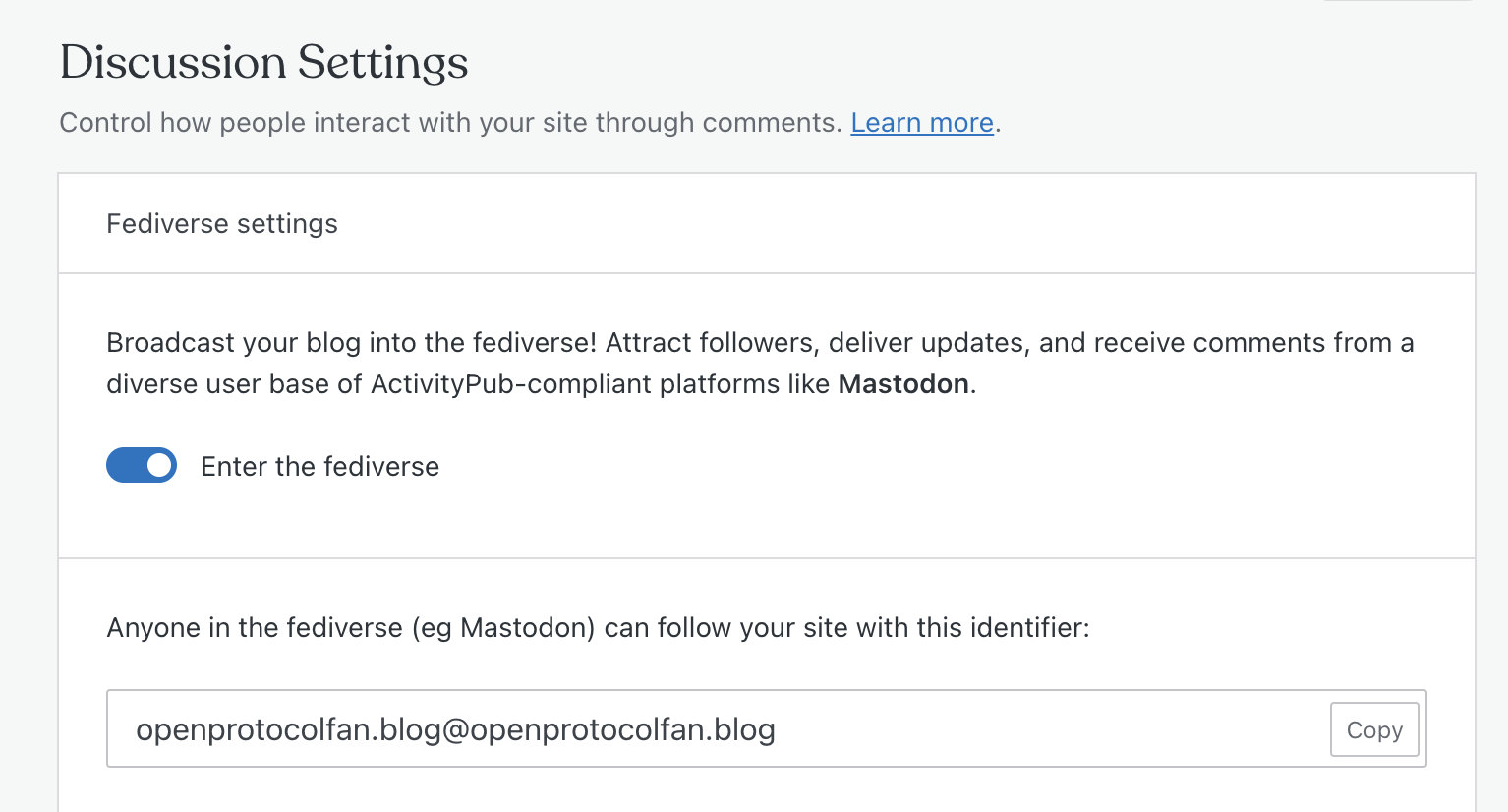
  1. From your blog’s dashboard, go to Settings > Discussion and activate the feature by toggling “Enter the fediverse.”
  2. Make note of your default fediverse profile name. In the example above, it’s the alias openprotocolfanblog.wordpress.com@openprotocolfanblog.wordpress.com. Your alias will be unique to you, of course, and will be far more memorable with a custom domain! (More on that below.)
  3. Follow your new profile on a federated platform, such as Mastodon.
  4. Share your profile name with others so they can follow your blog on federated platforms.

Remember, this feature is applicable to new posts only; and it might take up to 15 minutes for new posts to appear on federated platforms.

Why use a custom domain?

Upgrading to a domain doesn’t just give your profile a professional touch:

  • A shorter custom domain is simply more memorable than the default name provided.  
  • It ensures your profile is uniquely identifiable, making it easier for users across the fediverse to find and interact with your content. 
  • With a custom domain you can easily move your entire fediverse connection to any host at any time. 

Make new connections today!

Take advantage of this new opportunity to extend your blog’s reach, connect with diverse audiences, and create engaging dialogues. It only takes seconds to enable this simple yet powerful feature on WordPress.com. And remember, upgrading to a domain not only emphasizes your unique identity but also enhances profile portability. So, why wait? Dive in and showcase your content to the world!

New to WordPress.com: Earn More By Adding a Paywall 

While there are many ways to monetize your website, there’s one strategy that stands out for its potential and simplicity: the paywall. We’re excited to tell you that this feature is now available on all WordPress.com sites. 

Let’s explore why and how to use the new Paywall Block. 

What is a paywall and what are the benefits?

A paywall allows you to restrict certain pieces of content on your site or newsletter, requiring your readers to subscribe in order to access your work. 

Generally, you’ll insert a paywall partway through a post, allowing all visitors to see a portion of the content, but then incentivizing them to subscribe in order to read the rest of it. 

If you’re wondering whether this strategy is worth considering, here are the three key benefits:

  1. Revenue generation: By offering premium content behind a paywall, you open a new revenue stream and diversify your income.
  2. Audience loyalty: Paying subscribers are committed to your content, and are more likely to share your content and contribute to your site’s growth. 
  3. Content versatility: You can now offer a mix of free and premium content, and adapt it to each situation. For example, you can upload a podcast and put the transcript behind the paywall, or write a detailed case study and put the downloadable content and resources behind the paywall. These limitless opportunities make it easier for you to attract a wider audience—you can use your free content to draw in new users, and then entice them to subscribe for access to premium content.  

How to use the Paywall Block

You can add the Paywall Block anywhere in your posts or pages:

  1. In the editor for any post/page editor, type “/” or click the inserter (“+”) button to add a new block.
  2. Search for “Paywall,” insert the block, then drag it wherever you want.
  3. From the toolbar or the right sidebar, choose the audience segment who will have access to the content below that paywall—and you’re all set! 

You can also add the Paywall Block to previously published material.

Amplify an existing site with newsletter features

Whether you already have a well-established site or you’re starting from scratch, at WordPress.com you have all the tools you need to start a newsletter. With the Subscribe Block and Newsletter Patterns at your disposal, you can get a publication up and running in no time. With the new Paywall Block, we’ve added another piece to your newsletter toolbox.

What’s next?

WordPress.com is ever-evolving, and we’re always refining the design, experience, and offerings for writers, creators, and publishers like you. We’re all ears for your ideas to make it even easier for more people to publish and earn from their work.

Try out the Paywall Block and let us know what you think in the comments. We’re always listening to your feedback.

Upcoming Webinar: Effortless Course Creation With Sensei

The shift towards online education is more than just a trend—it’s a significant and lasting change in how we share knowledge with the world. Whether you’re an experienced educator, corporate trainer, or influential thought leader, our upcoming webinar will equip you to set up and manage your own online course effectively.

In this comprehensive live demonstration, our WordPress.com specialists will walk you through the process of creating, managing, and monetizing your online courses using the Sensei Learning Management System (LMS) plugin with WordPress.com. You’ll learn:

  • Setting up your course outline
  • Creating engaging and educational content
  • Utilizing AI educational tools
  • Other tips for managing your courses

This valuable webinar is free to attend and will conclude with a live Q&A. Don’t miss this chance to elevate your educational or training initiatives through the synergistic capabilities of WordPress.com and Sensei. We’re offering two sessions the week of October 16th—sign up below!

Don’t miss our other October webinars!

This month we’re introducing you to the full power of WordPress plugins and the critical role a custom domain plays for your site. Both sessions aim to provide the tools required to elevate your website to new heights.

Picking the Perfect Plugin

Extend your website’s capabilities beyond its basic functions with the right plugins. In this interactive session, our Happiness Engineers will guide you through the process of selecting, evaluating, and managing plugins to enrich your WordPress.com site. Learn the essentials to make informed decisions that cater to your site’s unique needs.

Mastering Custom Domains

Unlock your site’s full potential with a custom domain. In this session, you’ll learn how to find, register, and connect the ideal domain to your WordPress.com site, and the advantages of adding a domain-specific email addresses to increase your email open rates. Our experts will provide the knowledge you need to manage your domain with confidence.

Join us for our October live webinars, carefully curated to benefit both novice and experienced site owners. Each webinar is free to attend and features a live Q&A session with our expert Happiness Engineers. Make the most out of your WordPress.com experience by attending these invaluable sessions.

Managing Domains on WordPress.com Has Never Been Better

Your domain is the lifeblood of your online presence. For the last few months, we’ve been hard at work building a number of exciting features to ensure a world-class domain name experience on WordPress.com whether you have one domain or one hundred! 

Below, we highlight a handful of new enhancements in how you manage and organize your domains on our platform. 

Table of Contents

  1. Table of Contents
  2. A fresh look for your domains dashboard
  3. Secure your domain for the long term with multi-year registrations
  4. Amplify your brand with domain (and subdomain) forwarding 
  5. Easily transfer your domain to another WordPress.com user 
  6. Bulk updates now available 
  7. DNS imports made simple
  8. Ready to dive in?

A fresh look for your domains dashboard

One of the first things you’ll notice is the stunning visual overhaul of the domain management dashboard. We’ve made significant improvements to make it more intuitive and enjoyable, especially for those of you with multiple domains. 

Secure your domain for the long term with multi-year registrations

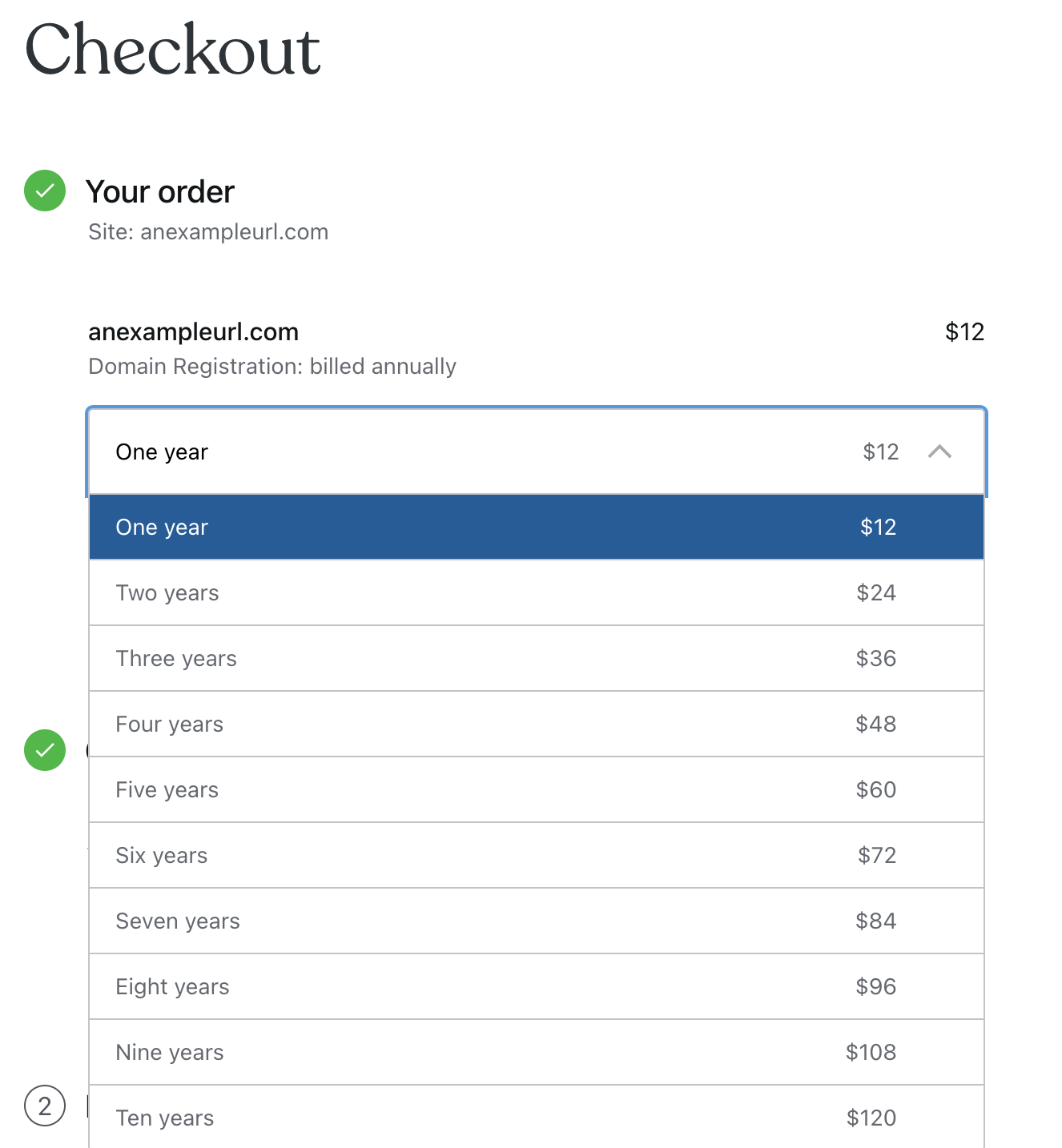
You can now secure your domain(s) for multiple years at a time, all the way up to ten years for most TLDs. Remember, you don’t need to have a website with WordPress.com to house your domain with us. 

Amplify your brand with domain (and subdomain) forwarding 

This feature is perfect for folks who want to utilize a unique domain name that will lead visitors to a specific site or page. Forwarding your domain or subdomain can be used for a number of purposes:

  • E-commerce Campaigns: Launching a product? Secure a catchy domain and point it directly to your product page.
  • Rebranding: If your long-established domain isn’t snappy, mask it with a more memorable one.
  • Social Media Simplification: Make it easy for people to find your Facebook or LinkedIn by redirecting a unique domain straight to your profile.

Learn more about domain forwarding. 

Easily transfer your domain to another WordPress.com user 

If you’re looking to transfer a domain to another WordPress.com user, there’s no need to reach out to our Happiness Engineers. Do it yourself with a single click from the transfer settings page.  

Learn more about domain transfers. 

Bulk updates now available 

We’ve made it easier than ever to manage multiple domains. With our latest update, you can now perform bulk updates, like setting auto-renewal options or updating your contact details. No more clicking through to individual domain management pages. 

DNS imports made simple

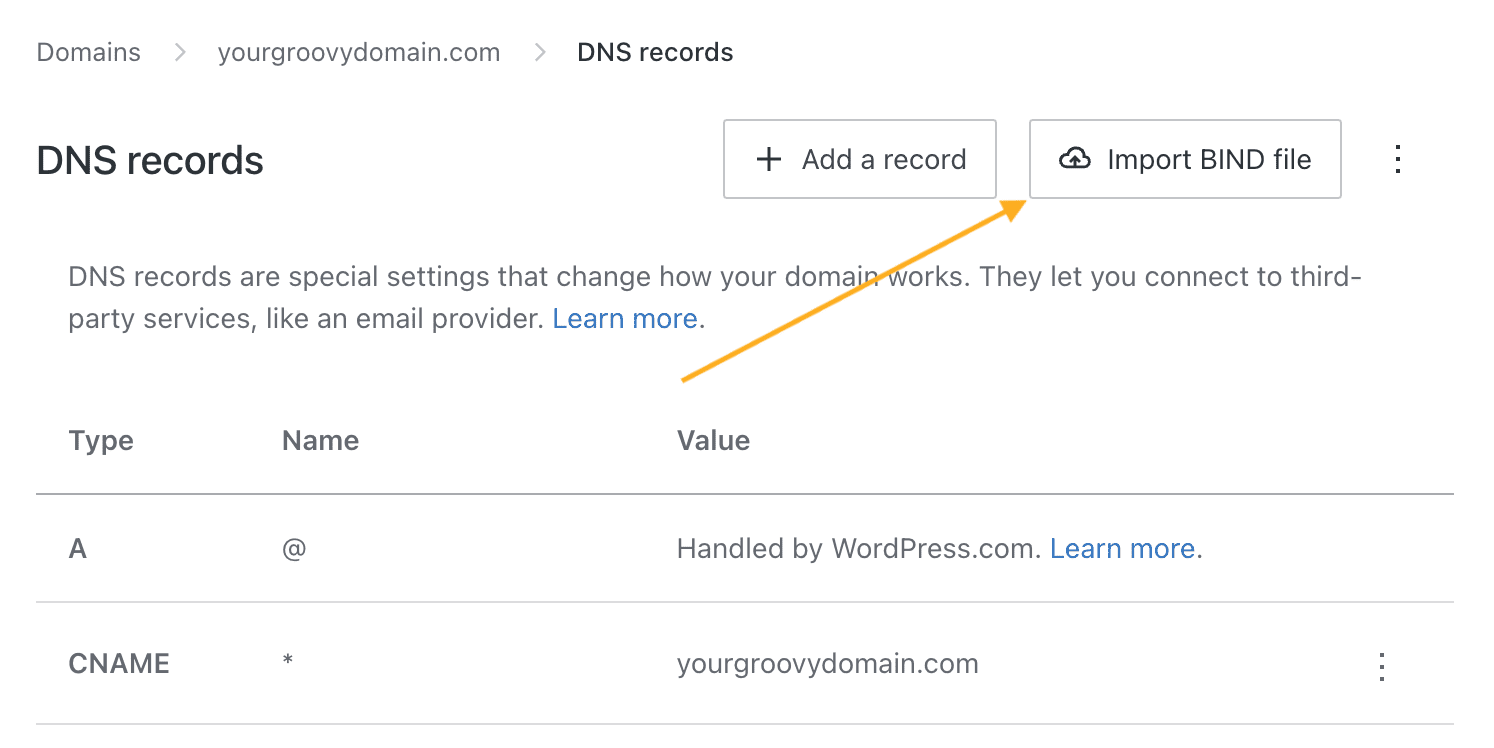
With every domain transferred to us, we attempt to discover and import your DNS records automatically to make sure your website, email, and other services continue working as expected after the domain transfer is complete. We also allow you to import all your DNS records using our new BIND file imports. Both those features are available to you to allow a smooth transfer of your domain. We still recommend all our users check and confirm all their DNS records were imported successfully to avoid any service interruptions.

Ready to dive in?

We can’t wait for you to try out these feature upgrades yourself. If you have domains with us already, visit your dashboard:

If you need a new domain, get started here: 

And if you have a domain to transfer from Google or Squarespace, we’ll cover the fees for you and provide an extra year of registration. Learn more and get started here. 

Thank you for choosing us as your trusted domain hosting provider. We’re excited to continue supporting your online journey and helping you make a lasting impact on the web.

Even More New WordPress.com Themes for September 2023

The WordPress.com team is always working on new design ideas to bring your website to life. Check out the latest themes in our library, featuring beautiful new options for bloggers, poets, bookworms, and visual creators.


Jaida

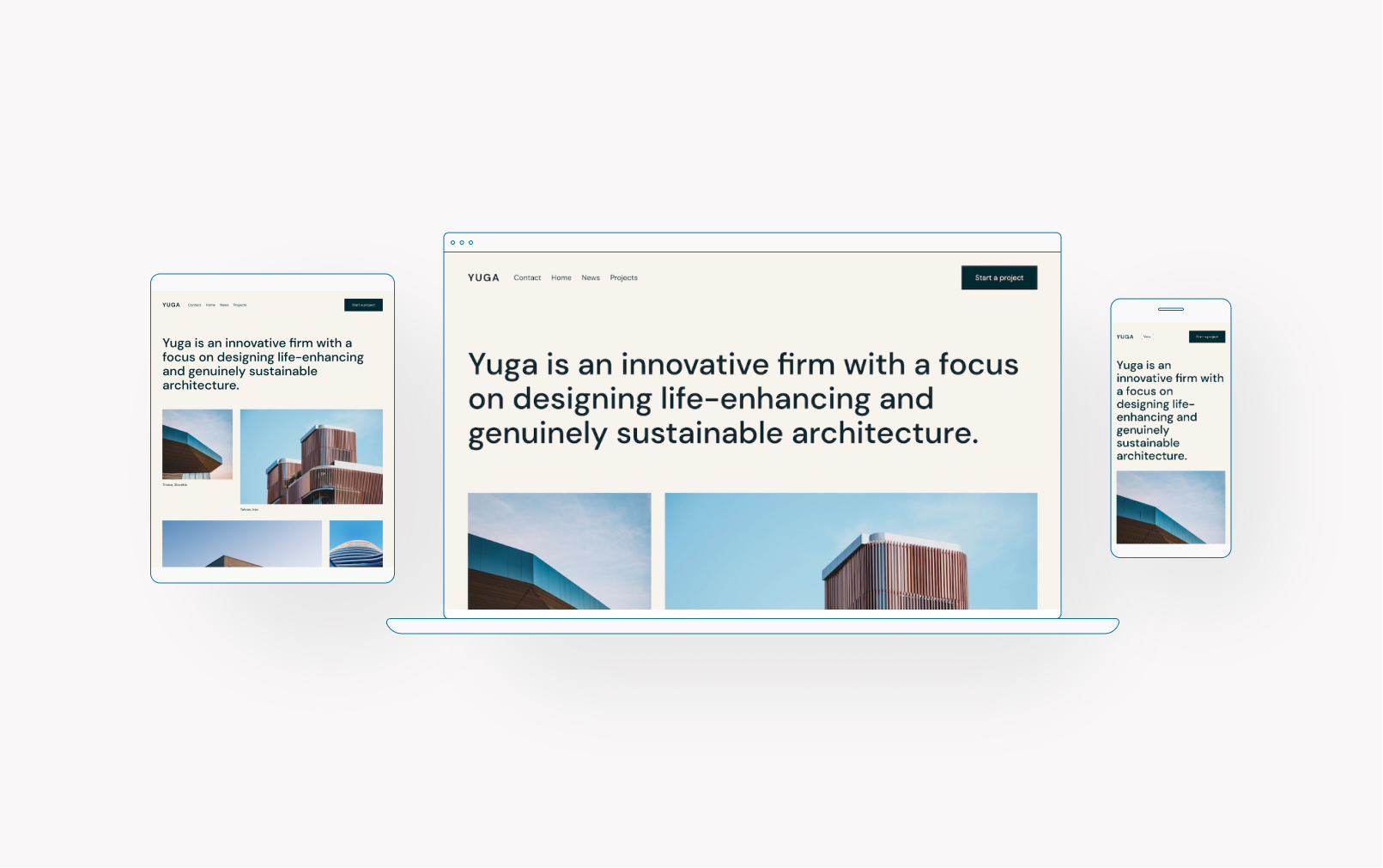
Jaida is a blogging theme that features a visually captivating homepage. Utilizing an elegant grid layout, we’ve ensured maximum visibility and engagement for your content. For individual posts, Jaida offers a thoughtfully crafted sidebar, enabling seamless navigation and an enhanced experience for visitors exploring your archives.

Click here to view a demo of this theme.


Mpho

Mpho is a minimalist single-column theme that draws inspiration from the types of short-form posts that you see on social networks like Mastodon and X. It prioritizes the post content and author, featuring a header with the author’s bio and profile picture. For single posts and pages, the header is replaced by a sticky section at the top that takes you back to the homepage, again highlighting the post content.

Click here to view a demo of this theme.


Poesis

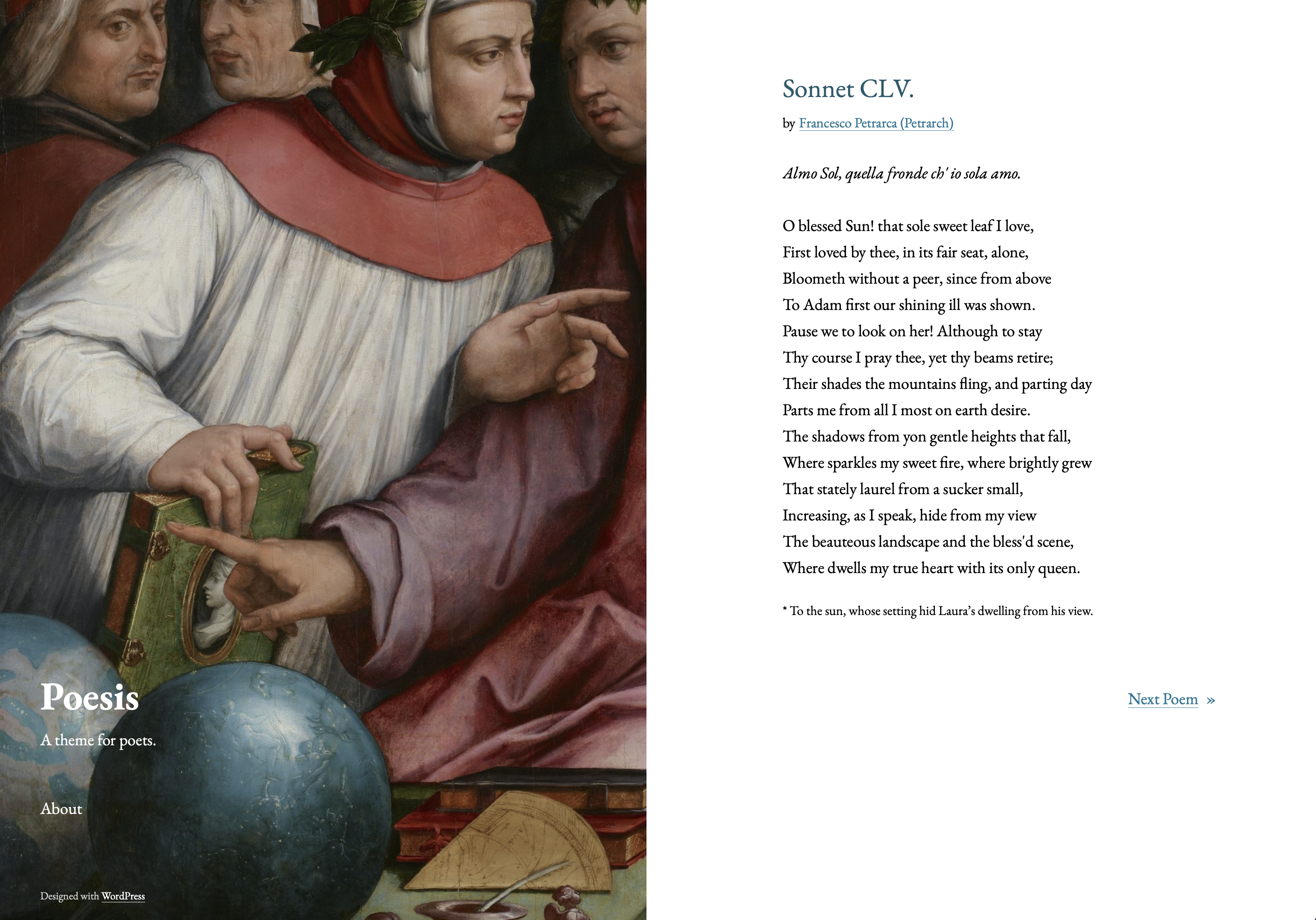
Poesis pays homage to the literary figures represented in the painting Six Tuscan Poets by the Italian Renaissance painter, architect, and art historian Giorgio Vasari. Naturally, this theme is ideal for publishing poetry or short stories. Its notable feature is a split layout, with a left-side column containing a sticky header and footer, and scrollable content on the right side.

Click here to view a demo of this theme.


Bibliophile

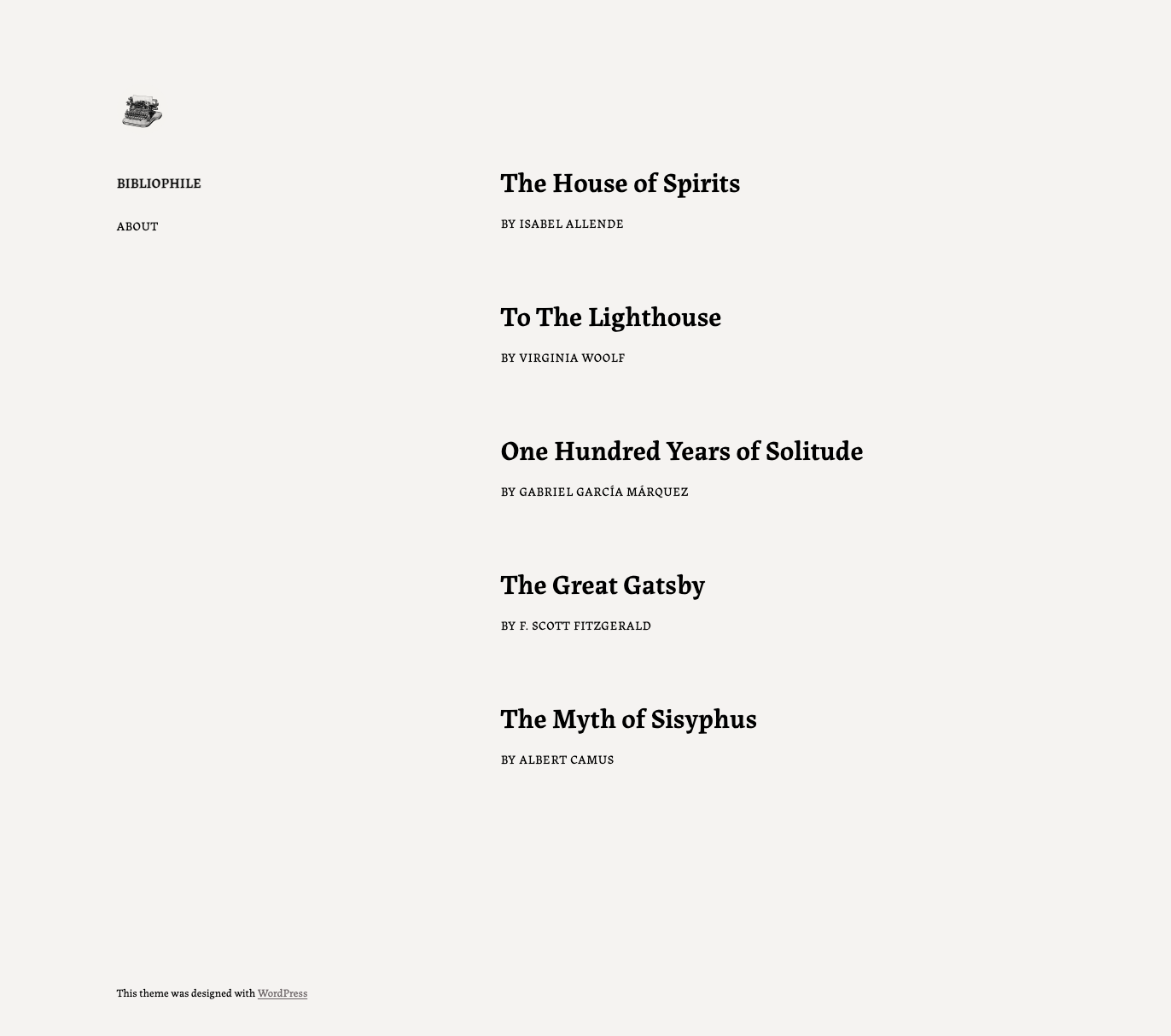
Bibliophile was designed to provide an impeccable reading experience. Its header on the left sidebar adds context, while its posts and content are elegantly displayed on the right. Inspired by printed books and utilizing carefully chosen font styling, Bibliophile offers a great solution for simple websites across devices. The layout is user-friendly and allows for seamless navigation, making it an ideal choice for those who enjoy reading on-the-go.

Click here to view a demo of this theme.


Grammer One

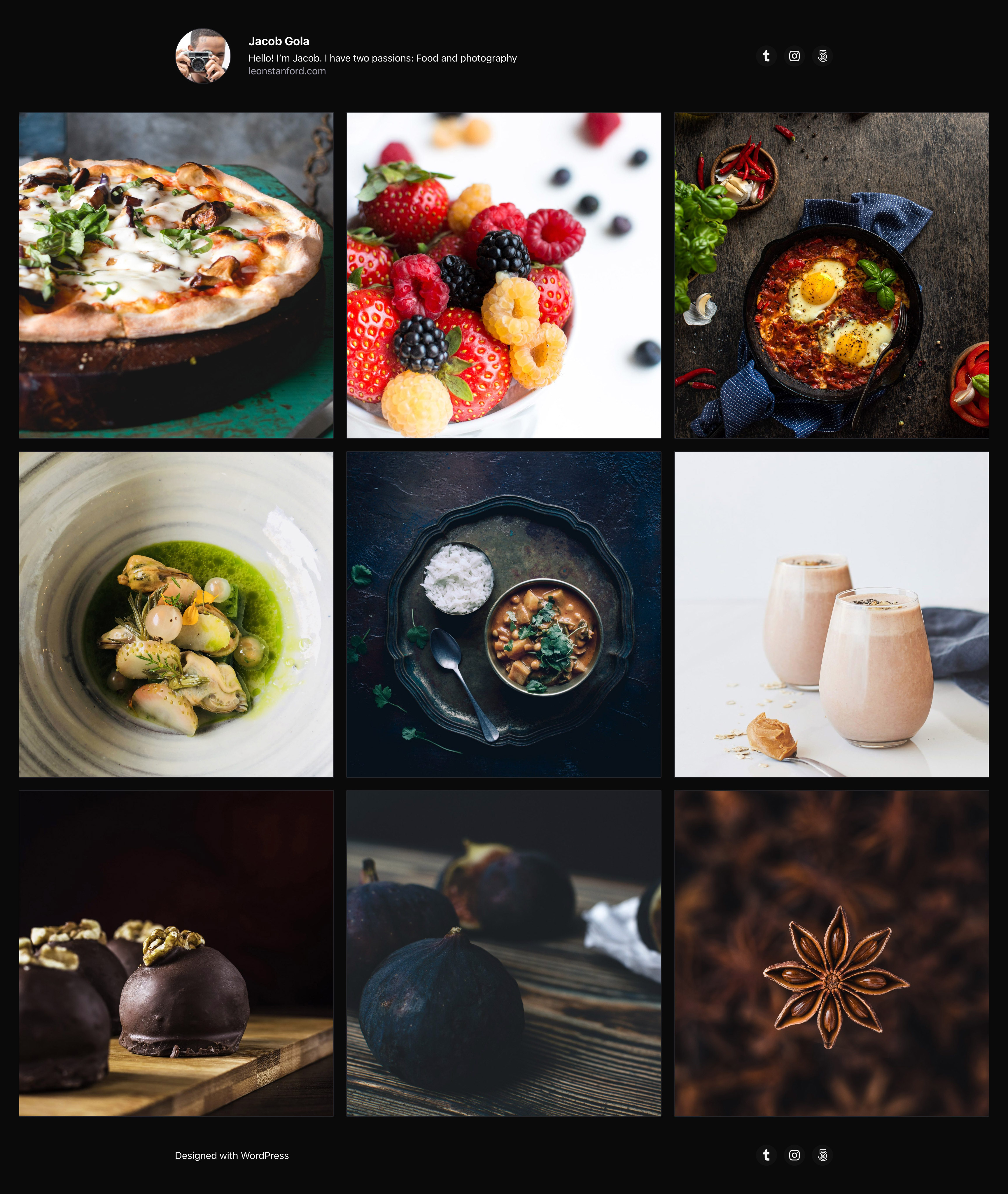
Bring the social media experience to your site and transform it into a showcase for your photos and videos.

Click here to view a demo of this theme.


To install any of the above themes, click the name of the theme you like, which brings you right to the installation page. Then click the “Activate this design” button. You can also click “Open live demo,” which brings up a clickable, scrollable version of the theme for you to preview.

Premium themes are available to use at no extra charge for customers on the Premium plan or above. Partner themes are third-party products that can be purchased for $79/year each.

You can explore all of our themes by navigating to the “Themes” page, which is found under “Appearance” in the left-side menu of your WordPress.com dashboard. Or you can click below:

Influence the Future of WordPress by Taking the 2023 Annual Survey Today

Each year, the WordPress community—users, site builders, contributors, and more—gives valuable feedback through an annual survey. Note: this questionnaire is provided by the WordPress project, not by WordPress.com. (Learn more about that distinction here.)

The results can influence the direction of the WordPress project by identifying areas that need attention, as well as helping track trends over time. This survey helps those who build WordPress—including our engineers here at WordPress.com—understand more about how the software is used and by whom.

To ensure your WordPress experience gets represented in the 2023 survey results, take the survey now.

The survey will be open for five weeks. Results will be published on the WordPress News blog in early December.

Please help spread the word about the survey by sharing it with your network. The more people who complete the survey and share their experience with WordPress, the more the project will benefit.

Thank you in advance for your valuable input on the future of WordPress!

A note about security and privacy

Data security and privacy are paramount to the WordPress project and community. With this in mind, all data will be anonymized: no email addresses or IP addresses will be associated with published results. To learn more about WordPress.org’s privacy practices, view the privacy policy.

Tell the Story You Want to Tell

In August, the WordPress community gathered at National Harbor, Maryland for WordCamp 2023. Every year, the conference hosts special speakers to talk about all kinds of things—from the technical to the inspirational.

One of our favorite talks this year was from sci-fi and fantasy author Ken Liu, in which he explores the profound role of storytelling in human life.

Liu conveys the idea that stories serve as a means to understand and communicate our values, emphasizing the importance of connection, playfulness, rootedness, empowerment, and self-definition. The power of story leads to the embodiment of one’s values, which allows us to pass along those values through lived experiences.

Ultimately, Liu teaches us how to embrace this power and rewrite our own narratives. We were so inspired by the talk that we wanted to share it with all of you! Watch the video in its entirety below: