Archivo de la categoría: Proyectos 8 2016

Auto Added by WPeMatico

Fan the Flames of Blog Post Promotion: 5 Tips for Creating Compelling Ads on Our Blaze Network

If you haven’t yet tried out Blaze, our incredible advertising wizard that helps to promote your blog posts across the WordPress.com and Tumblr networks, there’s no better time than now.

The beauty of Blaze lies in its automation capabilities. Our tool effortlessly creates the initial ad draft for you, making use of your blog post’s title, its featured image, and a short excerpt of the post.

But to get the most out of Blaze, it’s worth taking a couple extra minutes to make sure the ad is compelling enough to be worth a visitor’s click. Blaze ads are fully customizable, allowing you to tailor them to better reach and resonate with your audience. 

Let’s explore five proven ways you can maximize your ads’ impact.

1. Use your audience’s language

It’s not enough to know who your audience is; you must also understand their language. By language, we mean the specific jargon, phrases, and expressions your target audience uses. Incorporating audience language into your Blaze ads makes them more relatable, thus increasing engagement.

For example, if your blog is about fitness, use phrases like “HIIT,” “macros,” or “strength training.” These are terms your audience will be familiar with, and seeing them in an ad will likely grab their attention.

2. Add a unique image
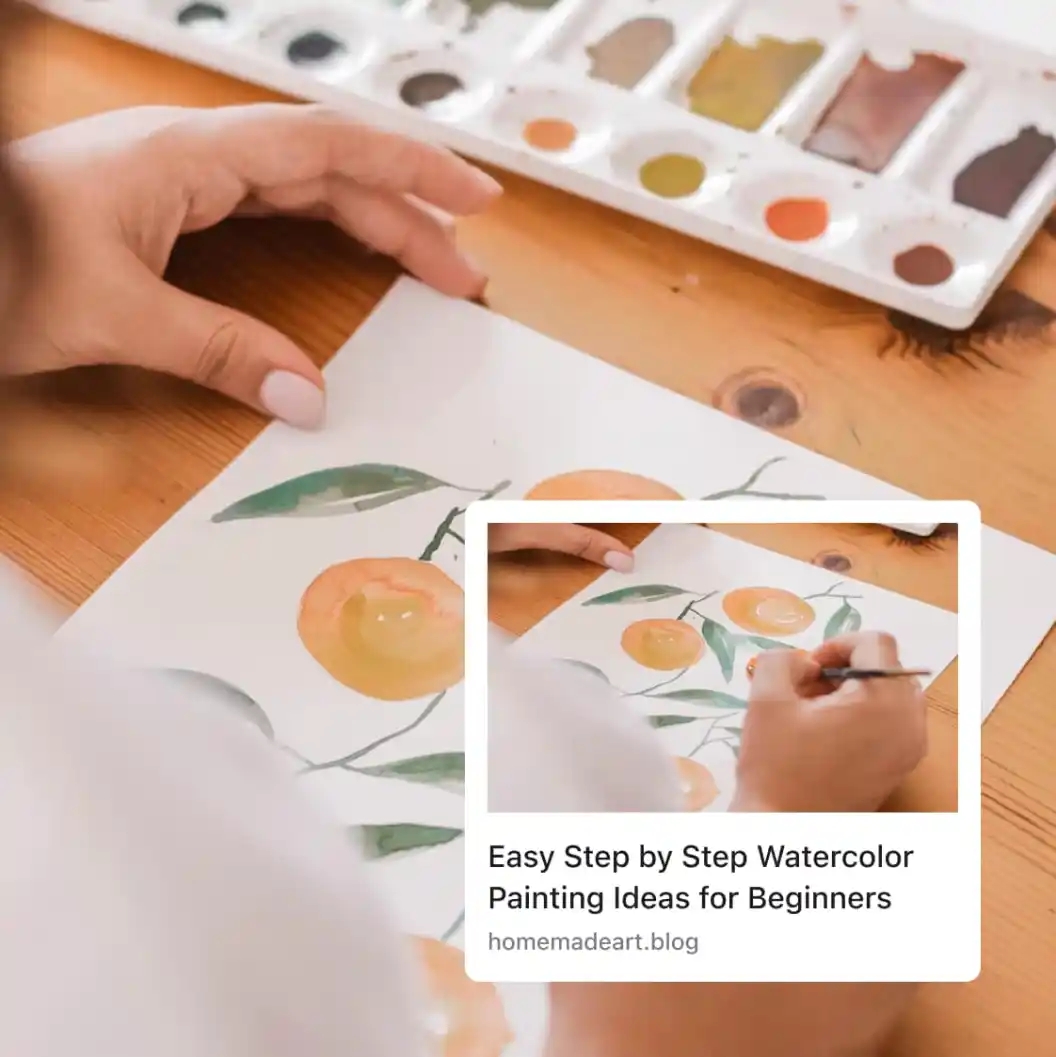
While Blaze does an excellent job of selecting your post’s featured image for your ad, it doesn’t know the whole story. If you have a more impactful, compelling image, don’t hesitate to swap it out. Remember, a picture can speak a thousand words and can often be the difference between a user clicking on your ad or scrolling past it.

3. Create a compelling headline

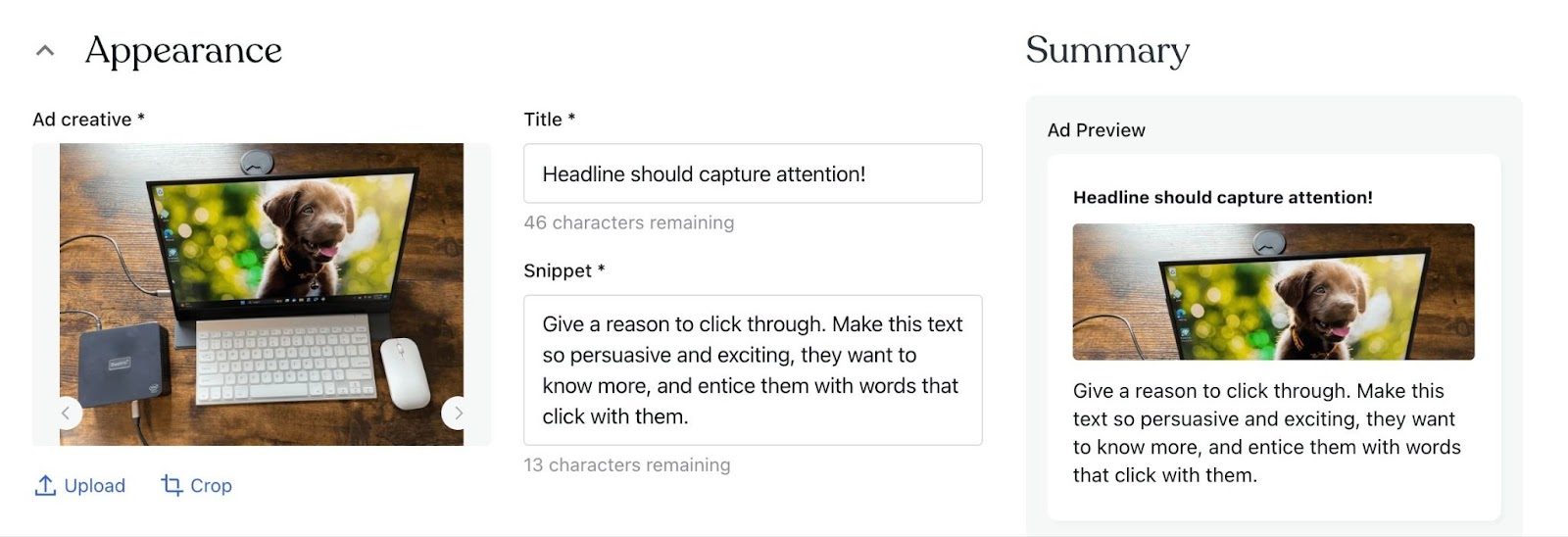
Blaze automatically uses your blog post title as the headline for your ad. However, you might want to consider creating a new, more compelling headline specifically for the ad. This headline doesn’t need to match your blog post title exactly; it just needs to capture attention and entice readers to want to learn more.

For instance, if your blog post title is “Top 10 Gardening Tips,” a more enticing ad headline could be, “Transform Your Garden With These Expert Tips.”

4. Craft a convincing call-to-action

While the post snippet gives readers a preview of your blog content, a strong call-to-action (CTA) can encourage users to engage further. For example, using words that imply exclusive benefits, such as “secret” or “new,” makes readers want to know more. In our gardening example, a CTA like “Discover the five simple secrets to a lush garden that only the pros know,” is enticing and gives readers a good reason to click on your ad.
5. Test and learn

Lastly, always remember the importance of testing different ad variations. Blaze’s customization capabilities allow you to try out other headlines, images, post snippets, and CTAs. You can even select different audiences to see which respond more favorably to your ads. See which combinations work best and refine your approach based on your learning.

Blaze is an incredibly powerful tool for boosting your blog post promotions, and with these customization tips, you can ensure your ads make the biggest splash possible. Don’t just set it and forget it—use Blaze to its fullest potential and watch your blog’s reach grow like never before.


The People Have Spoken (About Our Free Domain Transfers)

Since launching our domain transfer offer to Google Domains customers just over two weeks ago, we’ve been overwhelmed and heartened by the response of those who’ve made the switch. 

If you haven’t heard about this incredible deal and are one of the millions of folks looking for a Google Domains alternative, here’s why you should make the switch to WordPress.com ASAP: 

  • We’re paying transfer fees for the first million domains that move from Google to WordPress.com 
  • In addition to that transfer fee is an additional year of domain registration 
  • Free privacy protection — your contact information will stay private 
  • You’ll get a free SSL certificate if and when you choose to host your website with us 
  • We’re matching (or beating) all of Google’s prices for the long haul 
  • No website or hosting plan needed, ever, to keep your domains on WordPress.com  

Don’t take our word for it, though. Here’s what folks are saying: 

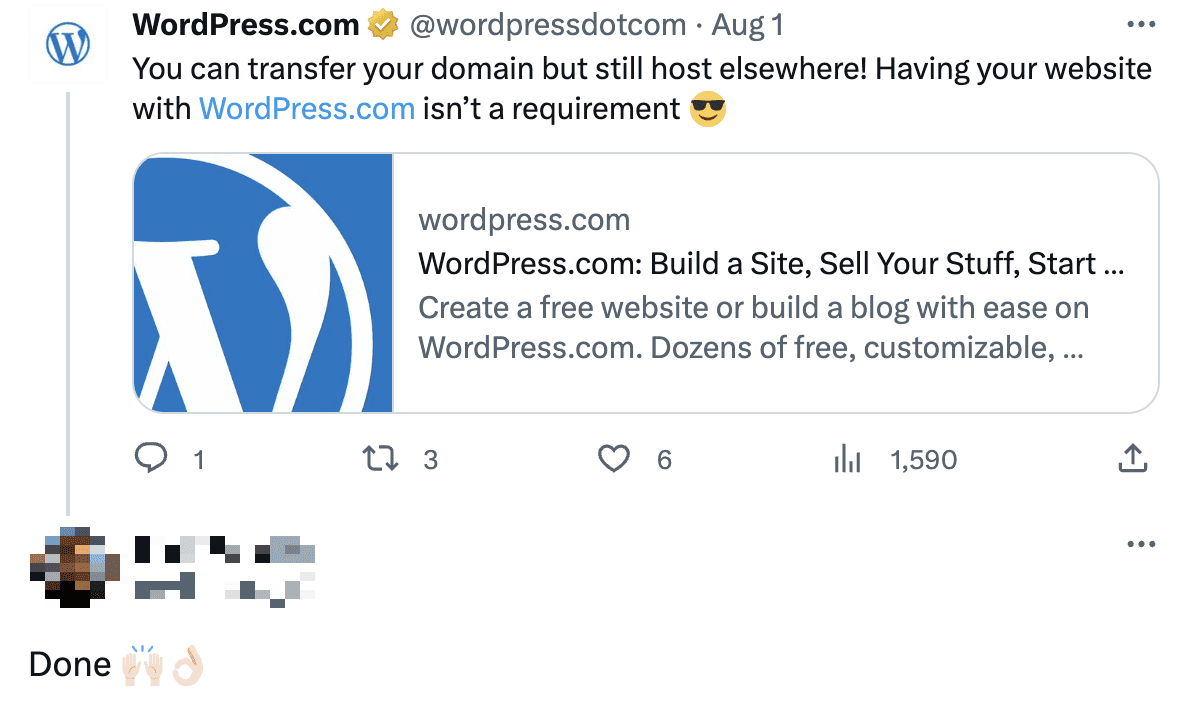
Screenshot of a customer on Twitter who was happy with the domain transfer process and thanked Matt for a great product.

To be clear, there’s no catch! WordPress.com has been a domain registrar for over a decade.

Screenshot of a customer's Mastadon post saying that he's glad that WordPress.com is continuing to uphold open source values and offer a domain alternative to Google/Squarespace.

(By the way, we’ve made a bunch of improvements to the Reader in the last handful of months. Check it out!)

Screenshot of a customer's tweet simply saying

It’s not just customers who are taking notice. The domains industry is weighing in too. DomainInvesting.com noted

“I would imagine there are many Google Domains customers who use WordPress for their website, so this offer makes sense.”

WPTavern, an outlet that covers WordPress news, commented

“WordPress.com is putting the heat on with a new offer to pay transfer fees and an additional year of registration for the first million domains moved from Google Domains. WordPress.com is also guaranteeing Google Domains customers the same pricing or lower for 400+ top-level domains.”

Search Engine Journal, the top spot for SEO news, compared our new offering directly to GoDaddy

Are WordPress.com Domain Registrations Cheap?

Yes, registering a domain with WordPress.com is very low priced, matching the low prices that Google Domains charges.

  • GoDaddy charges $21.99 per year for registering a dot com domain.
  • WordPress.com only charges $12 per year for the same dot com domain.

If you’re a Google Domains customer, be sure to move to WordPress.com today to take advantage of this incredible deal. If you’re not a Google Domains customer, we hope you’ll consider WordPress.com for your domain(s) management. You won’t find better long-term prices or support anywhere. 

The WordPress Site Editor Is More Powerful Than Ever

The WordPress Site Editor has come a long way since it was first introduced in early 2022. In the last couple of months alone, the WordPress project has added a handful of game-changing features that give you even more control and convenience in customizing your site to be exactly what you need. 

Below, we lay out how you can manage, create, and edit your content and design directly from this handy tool. 

Easily view and organize your menus  

When you click the “Navigation” tab in the Site Editor, you’ll get a great high-level view of your menus with the ability to preview, edit, and switch between each as you’d like. From here, you can organize menu links by simply dragging them with your mouse into the desired order. 

You can also click the three-dot menu and organize your navigation that way; from there you can also click through to the individual post or page that you’re moving around, in order to make changes on the fly. 

Create new pages; edit existing pages

You can now also access pages from the Site Editor — whether you want to edit existing content or add a brand new page. When you first click into a page from the Site Editor you’ll see some data on the lefthand side (date published, word count, time to read, etc.) and the page itself to the right of that. 

When you click the page, you’ll be brought into editing mode for that page with the option to edit the template as you’d like.

Change up your style  

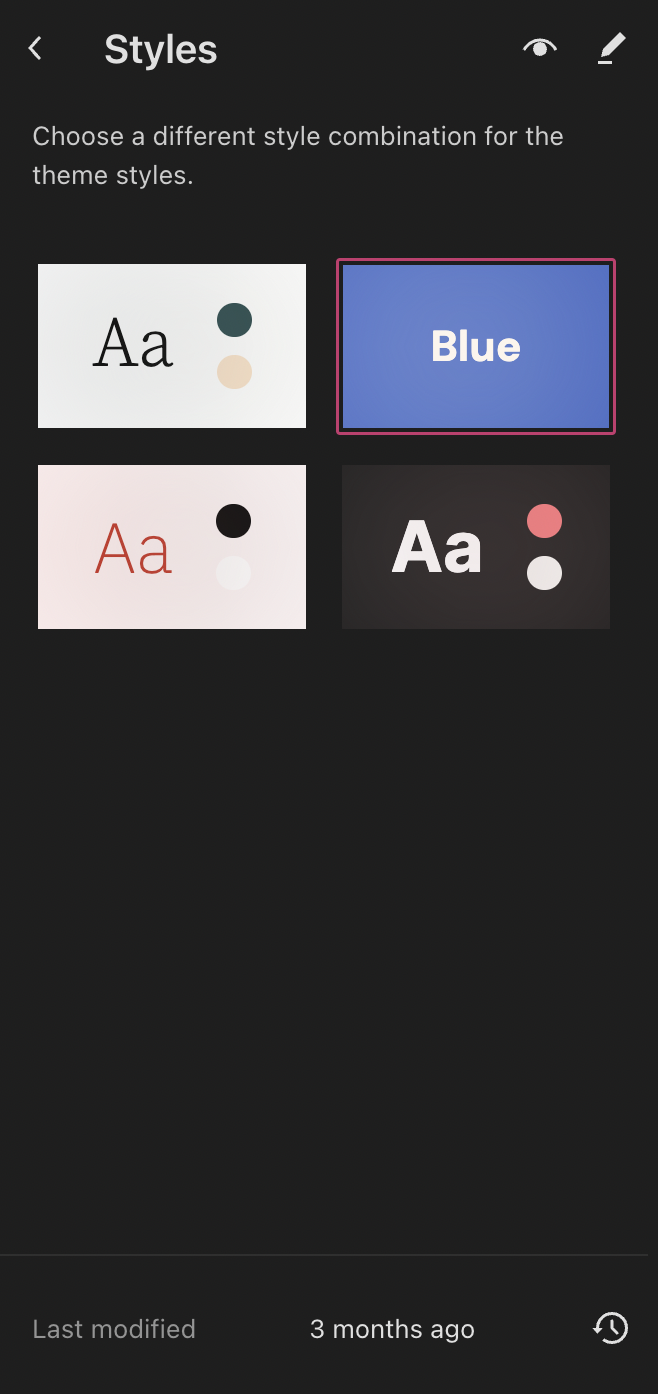
Not only is streamlined content management here, but so is design editing. There’s now a top-level Styles section in the Site Editor which allows you to experiment with and apply various color and font combinations, when they’re available for your theme. You can also open the Style Book from the Site Editor to get an idea of what various blocks look like with the different styles.   

Style revisions are also now accessible from the Site Editor, at the bottom of the left hand column, allowing you to easily see and revert to changes you’ve made in the past.  

Work in peace with distraction-free mode 

The popular distraction-free writing mode has been available for editing posts and pages for some time and we’re excited that it’s now available in the Site Editor as well. Work on your home page and templates without other controls or menus getting in your way. 

Distraction-free mode is accessible via the keyboard shortcut “Shift + Cmd + ” for Mac and “Shift + Ctrl + ” for Windows, or in the top right options menu. 

Resize the editor for quick previews 

If you’re curious about how all these changes you’re making will appear on various devices,  WordPress has added the ability to resize the Site Editor. With a simple click and drag, you’ll see what your site looks like on mobile devices, tablets, and desktops. If you resize to engage the full screen, you’ll automatically be placed in Edit View to begin editing. 


Try out the Site Editor and let us know what you think in the comments. We’re always listening to your feedback.

Site Editor vs. Page Editor: Explore Customization Tools in Our Upcoming Webinar

It wasn’t long ago that customizing your website meant outsourcing your design to an experienced developer or learning to code for yourself. Times are changing, though. With the new WordPress.com block editing tools, you’re able personalize all aspects of your site with point-and-click simplicity.

Learn how by joining us for August’s featured webinar: Site Editor vs. Page Editor: Using the Power of WordPress Editing Tools to Create Your Entire Site.

In this live tutorial, we’ll introduce you to the new WordPress.com Site Editor, which allows you to customize your website from top to bottom—no special coding skills needed.

Whether you’re a new or seasoned site owner, our experts will guide you through:

  • Distinguishing the site editor from the page and blog post editor
  • Locating and editing block theme templates
  • Assigning a new template to revamp your page or post appearance

This webinar is 100% free. All you need is a working knowledge of the WordPress.com dashboard and an eagerness to master site editing. Don’t forget to bring along your questions for our live Q&A session after the presentation!

Check out our other August webinars

We’ve prepared an exciting range of webinars this month to help you explore the vast potential of the WordPress.com editing tools and understand the importance of a custom domain for your website. These sessions are designed to arm you with the necessary skills to take your WordPress.com site to new heights!

Mastering Custom Domains

Establish a unique online identity that mirrors your brand and sets you apart from the crowd. Come along with us as we walk you through the process of selecting, registering, and associating a custom domain with your WordPress.com site. In addition, you will learn how a domain-specific email address can positively impact your email open rates.

Site Editing: Custom Headers

This session will demonstrate how you can effortlessly craft an outstanding header without needing to write any code. Whether you’re an entrepreneur or a zealous blogger, this webinar is intended to give you the ability to create headers that truly symbolize your brand and connect with your target audience.

Be a part of our WordPress.com live webinars, deliberately designed for both novice and experienced website owners. All our webinars are open to attend at no cost and wrap up with a vibrant Q&A session, allowing you to engage in meaningful conversation with our expert Happiness Engineers.

Hot Off the Press: New WordPress.com Themes for August 2023

The WordPress.com team is always working on new design ideas to bring your website to life. Check out the latest themes in our library, featuring beautiful new options with bloggers, diarists, and creators in mind.


Tenaz

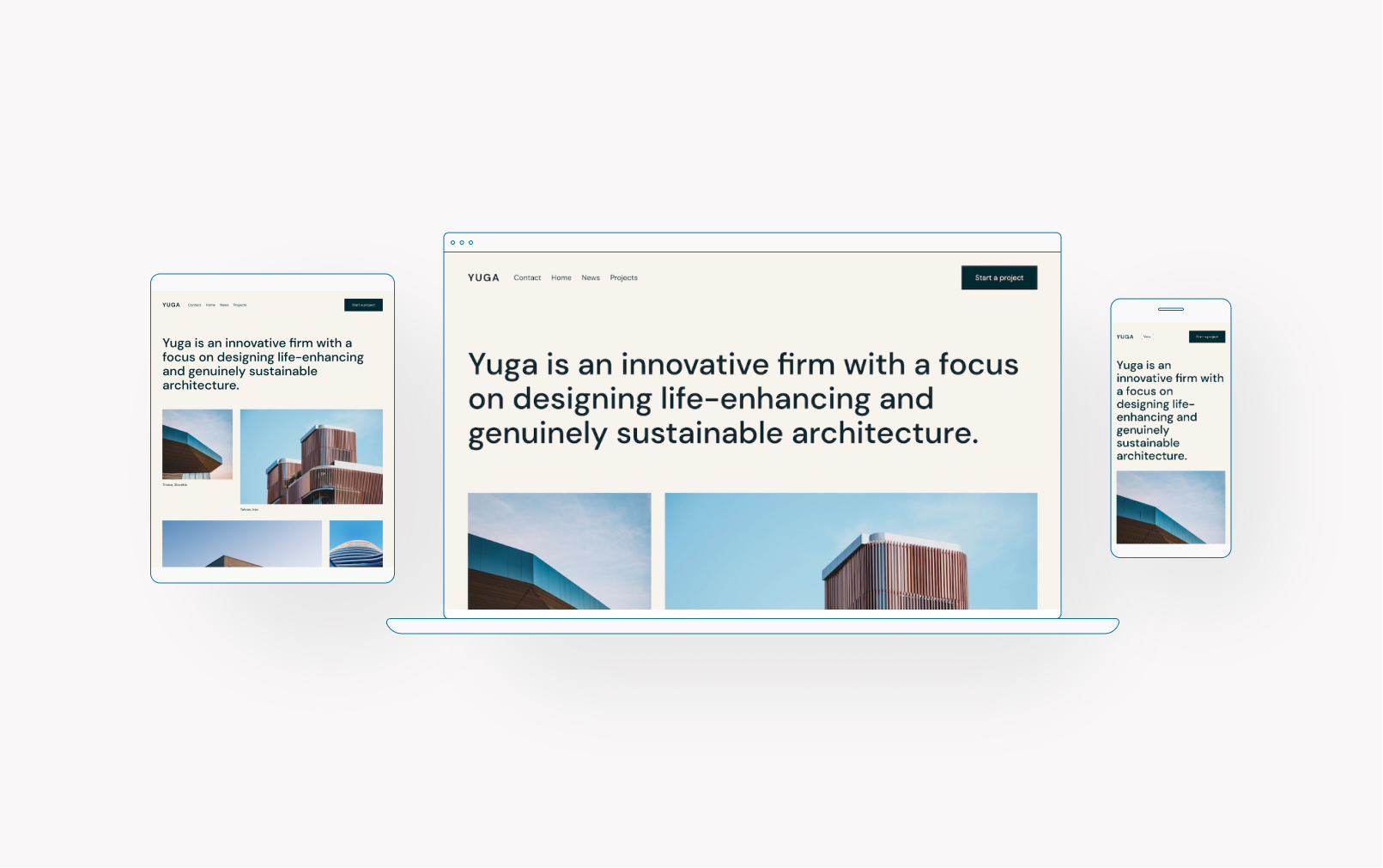
Tenaz (“tenacious” in Spanish) is a classic magazine theme with a rich, dense homepage perfect for professional bloggers or small media networks. Customizable elements are somewhat limited for this theme, but the black and white color palette is versatile and timeless.

Click here to view a demo of this theme.


Tomoni

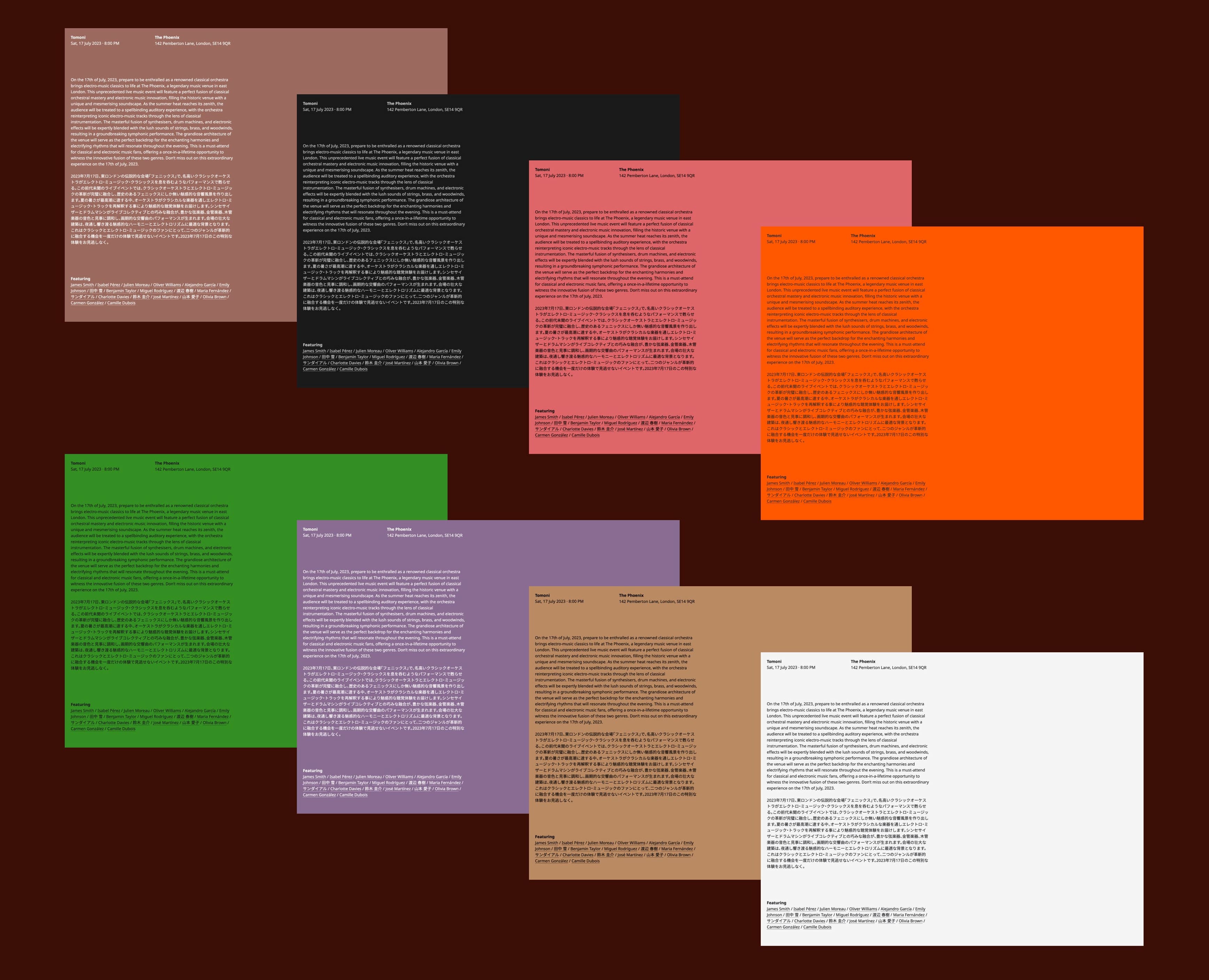
Takashi, the designer for this theme, was inspired by a visit to a design museum in the Roppongi district of Tokyo. Among the beautiful designs displayed there, the wall labels, written in both Japanese and English, also caught his attention. Takashi then started thinking about other examples of when dual language displays are needed, from road signs to posters in large immigrant communities. This theme, tomoni (“together” in Japanese), came to life from that idea.

Tomoni uses Noto Sans and Noto Sans Japanese, which makes both texts visually harmonic. There are eight color variations to suit a wide array of aesthetic flavors.

Click here to view a demo of this theme.


Entry

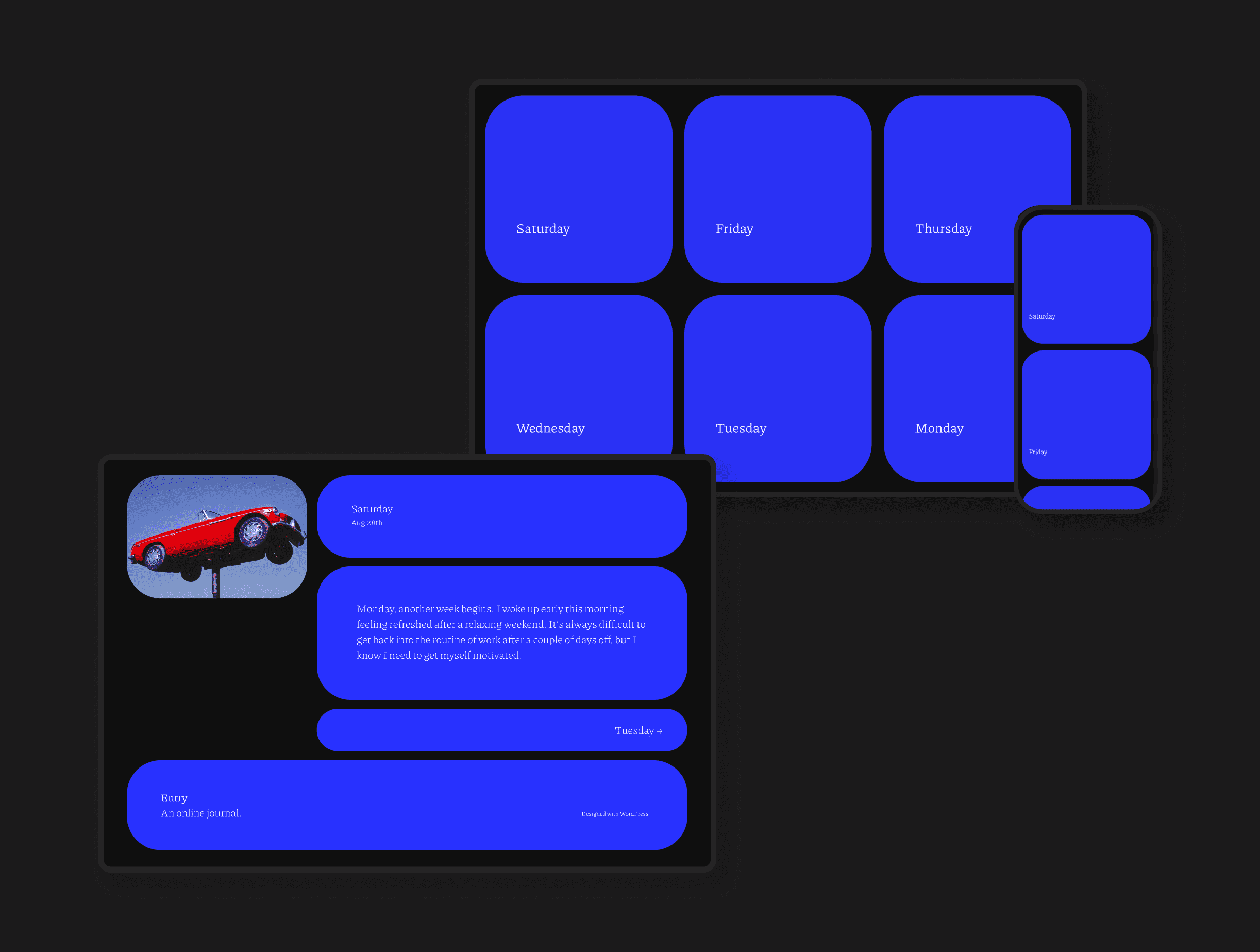
Entry is a uniquely styled block theme designed specifically for journalling. It features a blocky grid layout for posts, with every element contained in squared or rectangular shapes. This is a design that makes a statement.

Click here to view a demo of this theme.


Trellick

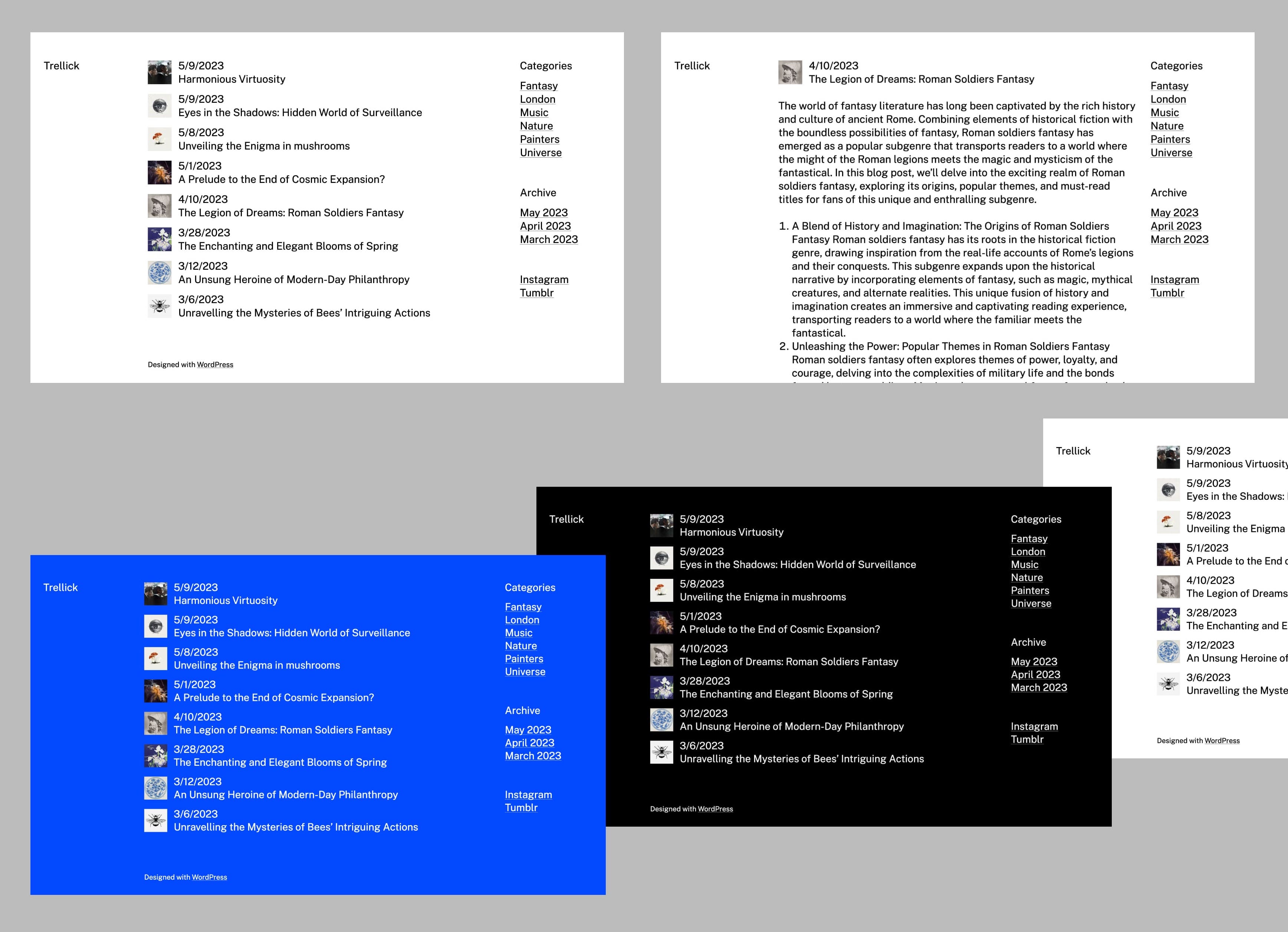
Trellick is a minimalist, raw blog theme that strips away the polished veneer of the modern “sameness” of web design — this theme shows the untamed essence of the digital realm. Embracing the architectural concept of Brutalism, Trellick showcases a bold, unapologetic aesthetic.

This design features three columns. The left (header) and the right (sidebar) columns are sticky, and only the main content in the middle column scrolls. The small, square-shaped featured image contributes a distinctive look. Trellick is available in four different color schemes.

Click here to view a demo of this theme.


Covr

Covr is a beautifully crafted theme that boasts a clean and modern design, specifically created to showcase images in an immersive and captivating way. Its full-width home template elegantly displays your portfolio, photography, or personal blog posts, providing an enjoyable browsing experience for your audience. Whether you’re a photographer, artist, or blogger, Covr is the perfect choice to present your work and make an impact.

Click here to view a demo of this theme.


To install any of the above themes, click the name of the theme you like, which brings you right to the installation page. Then click the “Activate this design” button. You can also click “Open live demo,” which brings up a clickable, scrollable version of the theme for you to preview.

Premium themes are available to use at no extra charge for customers on the Premium plan or above. Partner themes are third-party products that can be purchased for $79/year each.

You can explore all of our themes by navigating to the “Themes” page, which is found under “Appearance” in the left-side menu of your WordPress.com dashboard. Or you can click below:

The New and Improved Jetpack Mobile Editor

After introducing the Jetpack Mobile app earlier this year, we’re focused on making it the best WordPress experience on your mobile device. We’ve started by updating the design of the mobile editor. 

Below we walk you through the changes we’ve made that streamline your writing and editing experience on mobile. You’ll find these improvements when your app updates to version 22.9.

Fresh color palette 

We’ve replaced soft blue tones with a striking black and white style, which not only looks cleaner but is simply easier to see as well. Overall, we’ve aligned our styles more closely to the WordPress.com desktop experience, including the more familiar block inserter button.

Cleaner top navigation

We’ve hidden the site title to make room for global actions like “Undo.” Your site icon is shown next to the back arrow, where you can tap to leave the editor. We’ve also added a border to clearly separate the navigation bar from your content.

Faster media insertion 

We’ve added in-line media blocks when you have no other block selected, so you can add an image or video faster without opening the full block list.

More space to write

We’ve hidden the blue border around the paragraph block while you’re typing to let you focus on writing.

Unified block controls

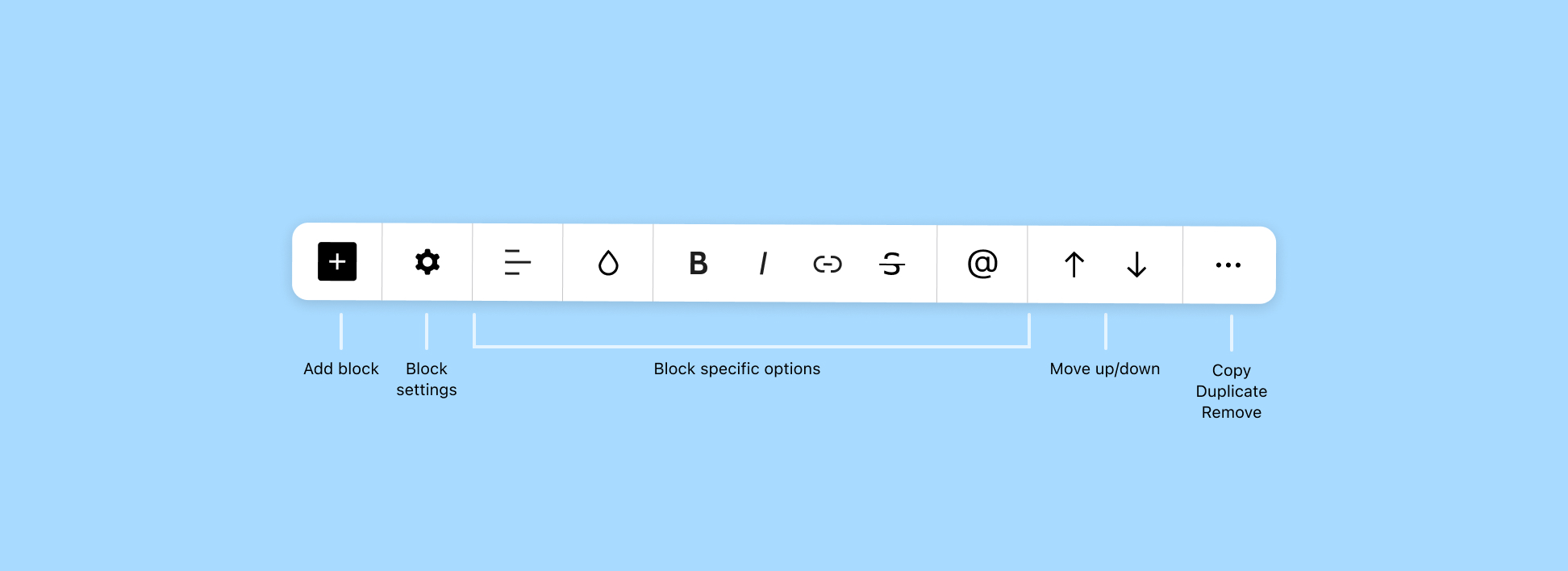
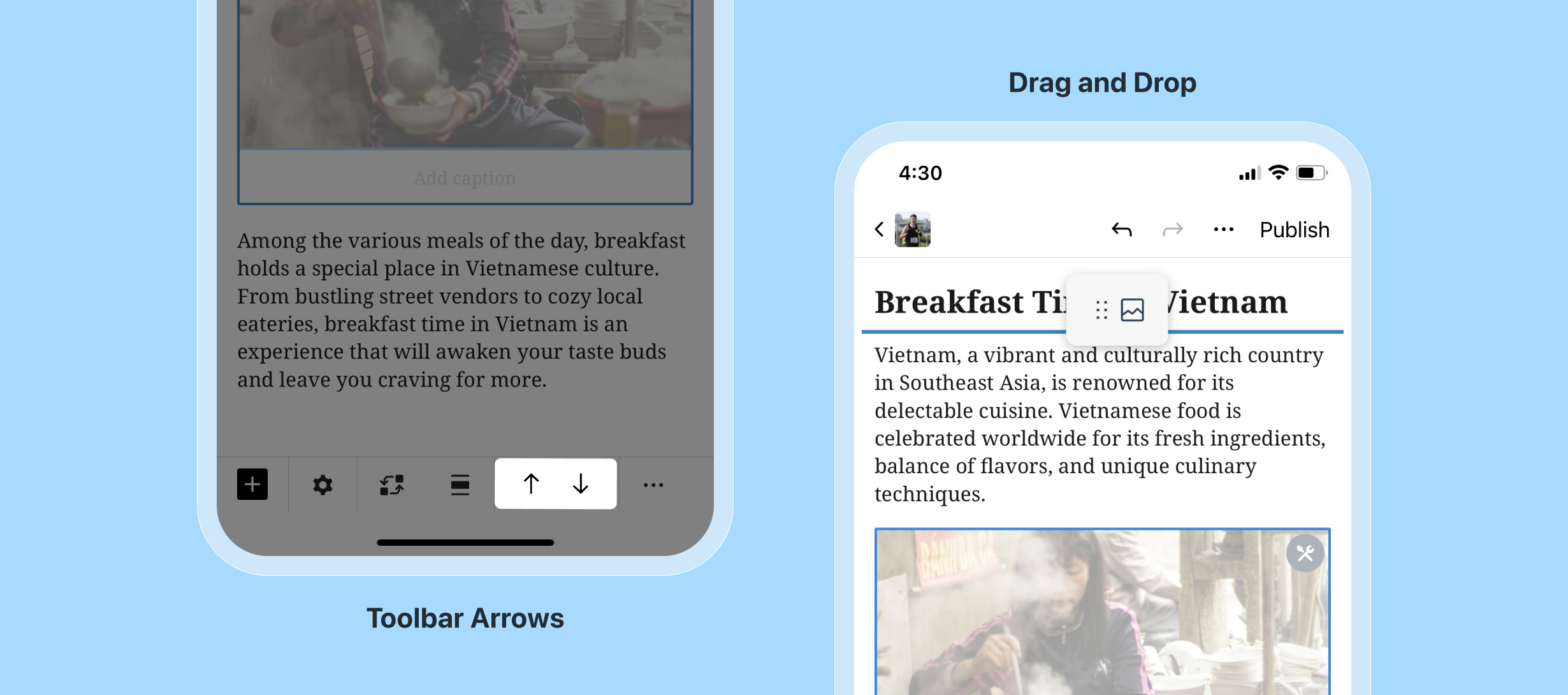
It used to be that some block controls were shown on top of the block, taking space from your content. Now all the block controls live in the toolbar, with the settings icon up first.

New ways to move blocks

The up and down arrows, which move blocks within your posts and pages, have moved to the right side of the toolbar. And if you missed it, we introduced drag and drop last year, so you can move blocks manually. 

More to come

You’ll find these improvements when your app updates to version 22.9.

We’ll be continuing to make improvements to the mobile editor. In the meantime, we’d love to hear what you like, what challenges you’ve encountered, and any ideas you have. It may very well shape what we work on next.

New Business-Focused Patterns: Testimonials, FAQs, and More

Have you used Patterns on your site yet? 

These prebuilt, customizable templates can be used to create product listings, customer testimonials, payment interfaces, contact forms, and so much more. All told, we have more than 275+ Patterns you can mix and match in your pages and posts at the press of a button.

If you’ve never used Patterns before, they’re like any other site element: Access them by hitting the inserter (or “+”) button at the top left of the page or post you’re working on, then selecting the “Patterns” tab. You can also click on the “Explore” button to bring up our entire library of Patterns, organized by category.

Let’s take a look at a few of the newest business-focused Patterns we’ve added to our library. 

Testimonials

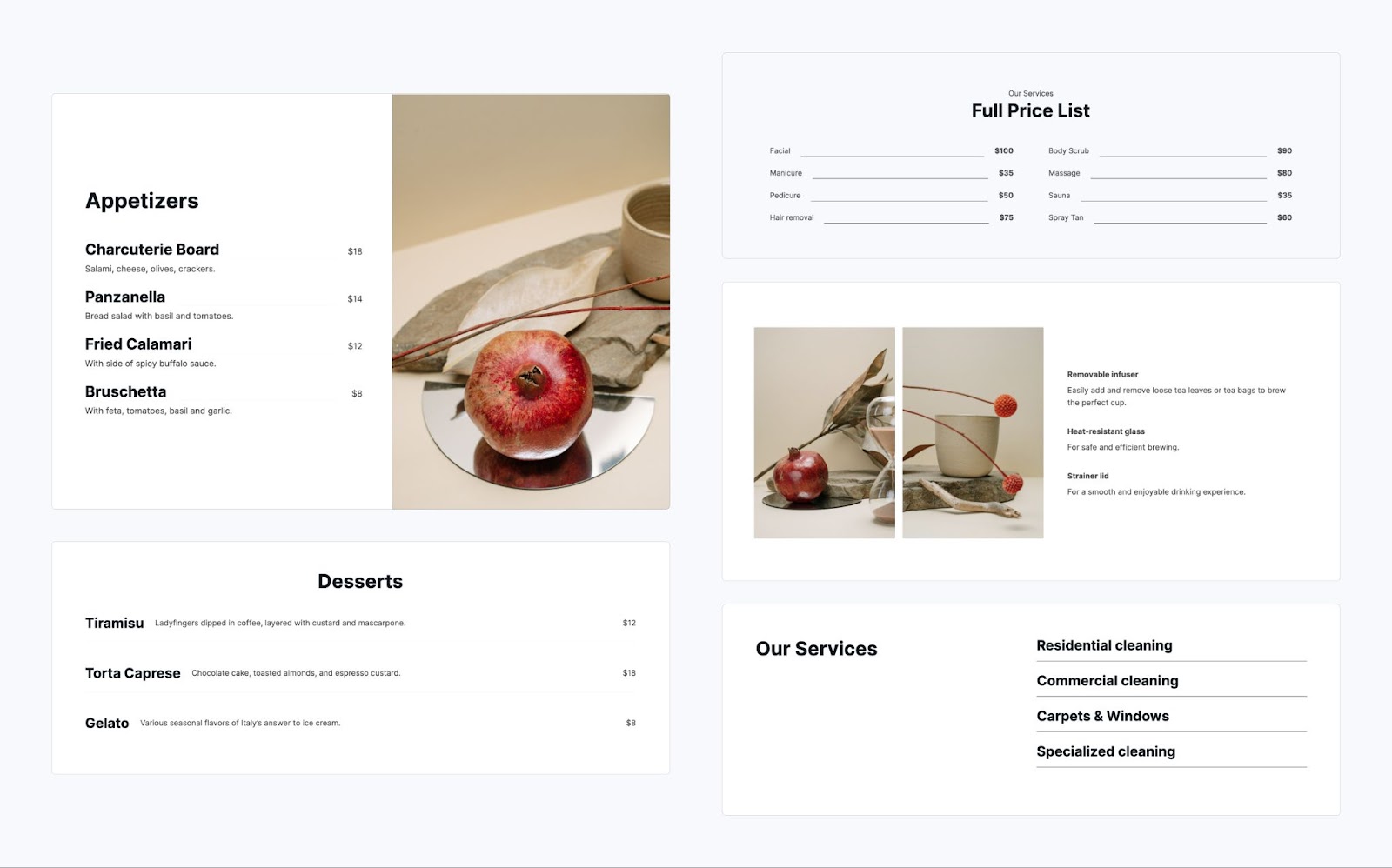
Boost trust and credibility for your small business with compelling testimonials. Choose from a number of carefully crafted Patterns to beautifully showcase customer stories and experiences on your website.

Services

Every small business website needs a services section, delivering clear information about your offerings. Whether you’re a restaurant, beauty salon, or local cleaning service, we have the perfect Pattern to showcase your products and services.

Pricing

A well-designed pricing section can be the centerpiece of your business website and a big sales driver. We’ve added a number of Patterns to our library that will make this task easy and fun!

FAQ

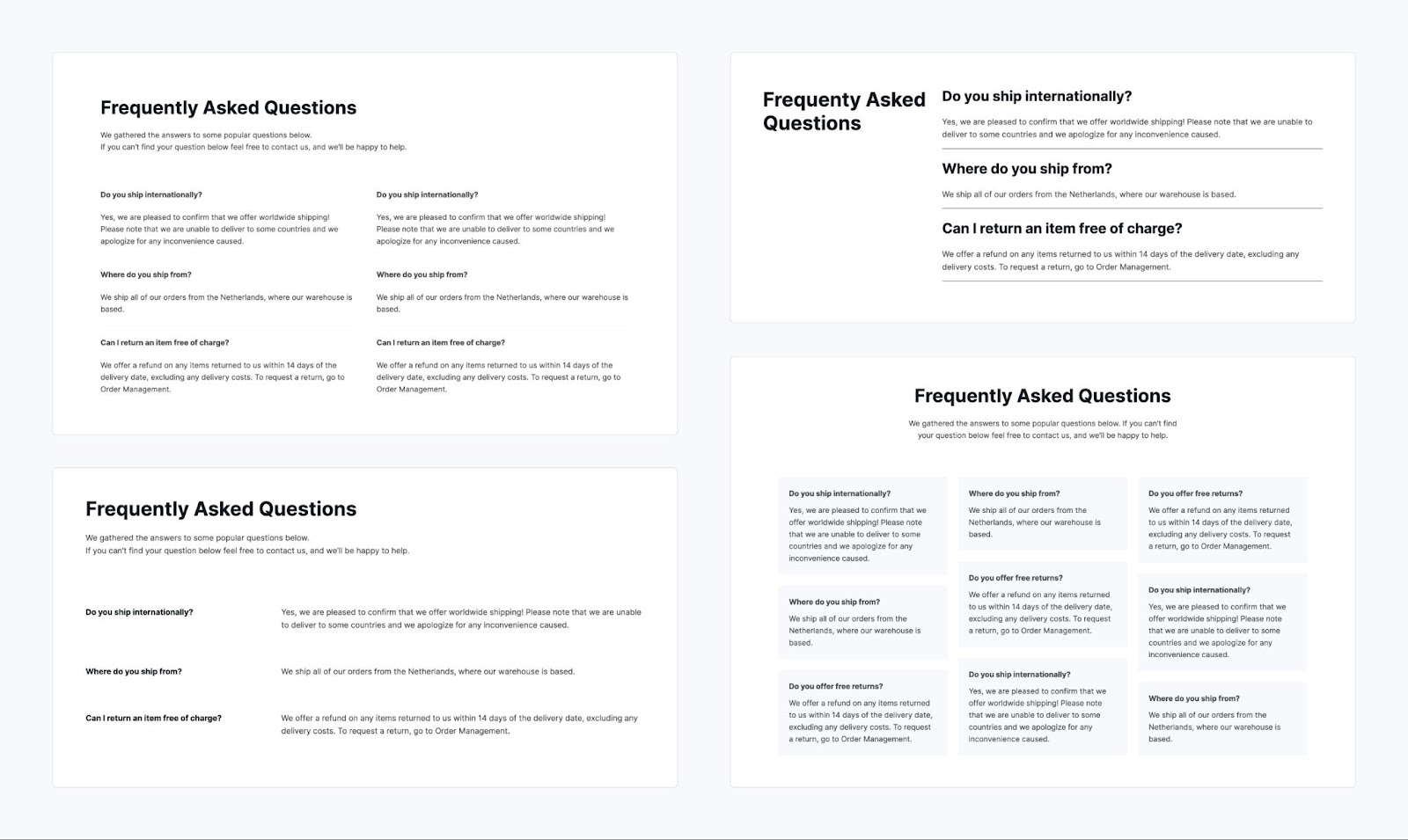
Answer common questions about your business, services, prices, and more with a beautiful and functional Frequently Asked Questions section. Adding one to your website is as easy as picking one of our FAQ Patterns, and customizing as desired with your own colors and copy.

Contact

A contact page is a must-have in order to easily connect with visitors, encourage inquiries, solicit feedback, and discover new business opportunities. Pick a Pattern that best suits your business and you’ll never miss a lead.

Payments

Accept credit and debit card payments effortlessly with our Payment Button Block. Choose from a range of stylish design options, making the payment process even more convenient and visually appealing for your customers.

Explore all of our Patterns!

Let our patterns library spark your creativity. We have options for featured products, menus, events, coupons, and more. Dive in by exploring all the hundreds of patterns in the WordPress editor. 

If you’re intrigued by Patterns but don’t have a site yet, get started by creating your own unique design today: 

Transfer Your Google Domains to WordPress.com—On Us

A domain is your most valuable online asset. A great domain name says something about you—your personality, your work, your creative spark. People understand this intuitively: when coming up with new ideas for a business or website, we don’t start with design or specific content. We start by giving it a name.

But if your domain name is currently with Google Domains, things recently became complicated. You may have heard that your account has been sold to Squarespace. Everything is expected to transfer and close later this year.

Fortunately for you, you’re not locked into that deal. And we think we can do better. For the first million domains that move from Google to WordPress.com, we’ll pay your transfer fee, which also extends your registration for an additional year. 

That’s just the beginning. Here’s our commitment to you when you bring your domain from Google to WordPress.com:

  • Your renewal price will be the same or even lower than what you were paying with Google Domains—and that goes for every one of the 400+ top-level domains (TLDs) we offer. This will also apply to existing WordPress.com customers across most domains, meaning that in many cases we’re lowering your prices!
  • This isn’t a temporary thing. We’re committed to keeping domain prices low, and will only raise them if our wholesale costs go up (we’ll run our domains business like Costco).

You may know WordPress.com as a leading platform for building stunning websites, but we’ve been a domain name provider for over a decade. You don’t even need a site or hosting plan to manage your domains with us. 

And you’re getting much more than just a URL:

  • Performance: Our DNS speeds are faster than Google, GoDaddy, and DigitalOcean. But don’t take our word for it. Feel free to check for yourself at dnsperf.com.   
  • Privacy: Unlike at many other registrars, privacy protection is free. (There are a few exclusions for non-U.S. domains.
  • Security: We install SSL for free for all domains hosted with us. And when you host your site at WordPress.com, we provide serious security features to keep your site running smoothly such as real-time backups, one-click restores, malware scanning, WAF (web application firewall), DDOS mitigation, and more.

What it really comes down to is that WordPress.com, along with the larger Automattic family, is committed to the open and inclusive web. Our mission is to democratize publishing for the entire world. Ultimately, we will always support your ability to truly own your content and identity on the web. 

And it all starts with your domain.

Even More New WordPress.com Themes for July 2023

The WordPress.com team is always working on new design ideas to bring your website to life. In July, we published so many new designs that a “Part Two” of our monthly theme roundup is in order. Check out these latest stylings especially if you have a blog or portfolio.


Fotograma

To create Fotograma, our designers borrowed from the fun and unique Stacks theme, which gives your website the look of a professional presentation. To that concept, we added a Cover Block to make this a one-page portfolio theme perfect for a photographer who wants to make a big visual impact.

Click here to view a demo of this theme.


Curriculum

Curriculum is a resume-like theme that echoes the structure of a professional profile page like you’d find on LinkedIn. It features original a unique visual structure and navigation, and a primary content area that’s perfect displaying your education, experience, work portfolio, and other information.

In this split layout design, the right side offers a “sticky” profile image while the left side features a large block of scrollable content. We chose a high-contrast color palette of blue with cream for the default style; there’s also a variation in maroon if you prefer something a little bolder.

Click here to view a demo of this theme.


Bute

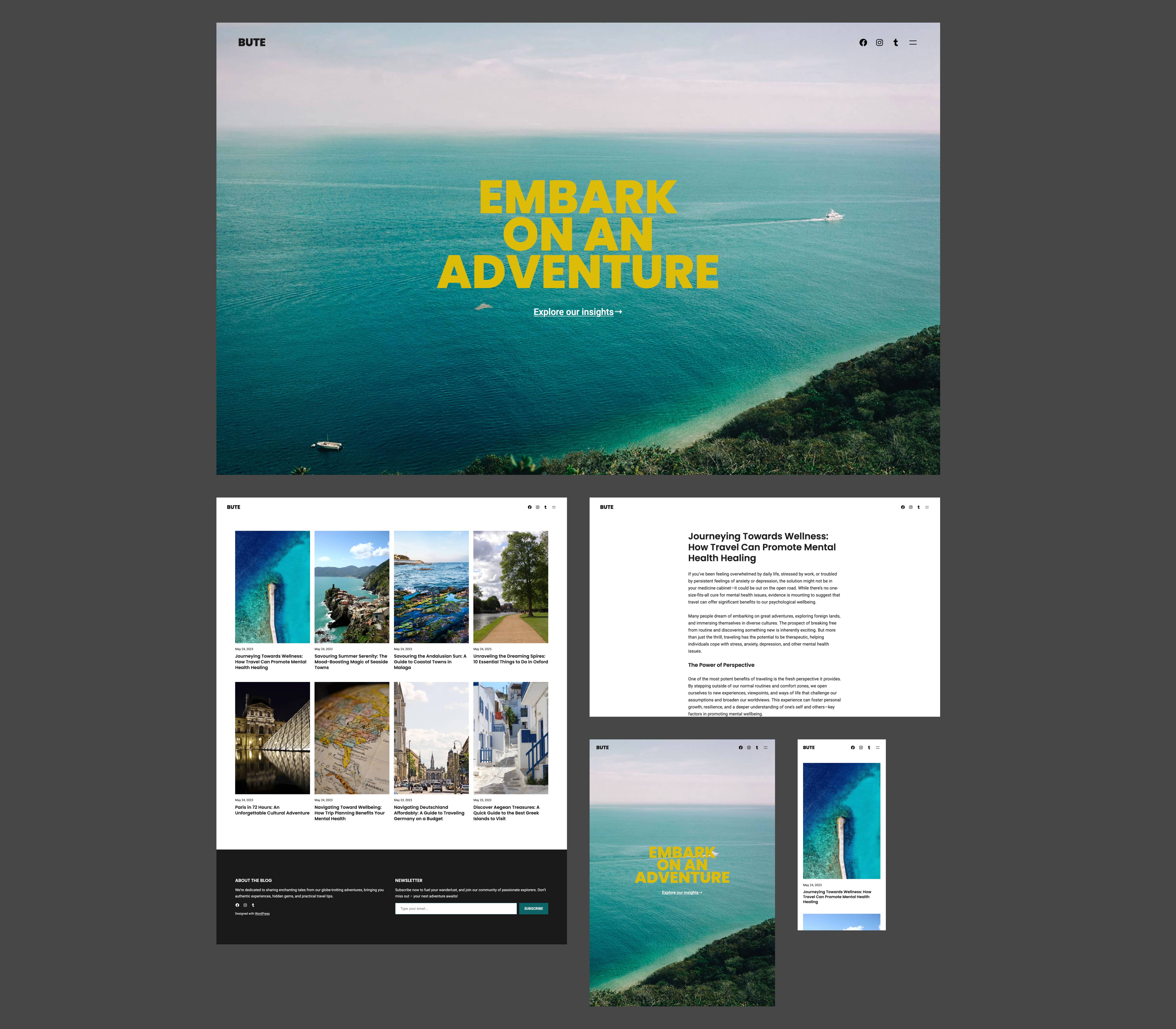
Bute is a simple blogging theme that features a full-screen Cover Block on the home page. It’s epic in every way, inviting the reader directly into whatever adventure you’ve embarked on yourself.

Click here to view a demo of this theme.


Loïc

Loïc is a theme designed with writers in mind. One small detail that sets it apart: for most pages and templates, we’ve replaced the site title with the post or query title. And whereas most of our modern themes utilize a sans serif font family, with Loïc we opted for Crimson Text, which is a serif typeface often found in book printing.

We’ve provided a total of six style options for this theme, allowing you to effortlessly transform your website’s tone to suit your individual aesthetic.

Click here to view a demo of this theme.


Artly

Artly is a blog theme designed for publications that place a premium on visuals. Its modern, offset layout for posts and pages allows you to showcase your content in a stunning but also functional way.

Click here to view a demo of this theme.


To install any of the above themes, click the name of the theme you like, which brings you right to the installation page. Then click the “Activate this design” button. You can also click “Open live demo,” which brings up a clickable, scrollable version of the theme for you to preview.

Premium themes are available to use at no extra charge for customers on the Premium plan or above. Paid themes are third-party products that can be purchased for $79/year each.

You can explore all of our themes by navigating to the “Themes” page, which is found under “Appearance” in the left-side menu of your WordPress.com dashboard. Or you can click below:

New Free Course—Newsletters 101: From Basics to Automation and Monetization

Unleash your inner creator! Dive into the exciting journey of crafting captivating newsletters with WordPress.com’s newest course: Newsletters 101: From Basics to Automation and Monetization

This completely free online course is designed to share the key skills of creating, managing, and monetizing your newsletter. Whether you’re a blogger, entrepreneur, or part of a non-profit organization, this is your gateway to reaching the hearts and minds of your audience directly in their inboxes.

Let’s dive in!

The power of newsletters

Newsletters offer creators and businesses a unique advantage: a simple way to establish a personal, direct line of communication with their audience, free from the whims and distractions of social media algorithms. Publishing a newsletter can help you forge stronger relationships with your subscribers, nurturing a loyal following over time.

And newsletters are an invaluable tool for generating revenue, too. People who sign up for your newsletter are much more likely to be interested in what you have to offer, which means they’re more receptive to your ideas, recommendations, and products.

Get set up for success

In this course we’ll walk you through the basics of setting up a newsletter, even if you don’t have a website. And if you already have a website you’d like to turn into a newsletter, we’ll also guide you on how to do so with just a few clicks. 

Our Newsletters 101 course will get you started with what you need no matter where you’re at or what your niche is. You’ll find pro tips, ideas, how-tos, and resources for getting the most out of your newsletter. 

The best part? The course is free and no registration is required. Just click the button below and get started!

Unleash your monetization potential

Want to make money through your newsletter? We’ve got you covered! We’ll walk you through setting up paid subscriptions, so you can start generating recurring revenue by simply sharing what you’re passionate about. 

We’ll also explore affiliate marketing, a way to earn commissions through carefully curated product recommendations. Plus, we’ll guide you on integrating ads or sponsored content, offering a win-win scenario where your audience benefits from valuable content, and you earn from your efforts.

Making it real

You might be thinking, “I’m not a techie, can I really do this?” Absolutely, yes! In this course, we break down everything into bite-sized pieces, making it simple to follow along, no matter your technical abilities.

And to support you on the way, we have an Education Community Forum where you can ask questions and celebrate your progress. 

See you there!

PS: Get the best out of our learning resources by checking out all of our courses, live webinars, and recorded replays