Archivo de la categoría: Alumnos

Just Launched: GitHub Deployments

Say goodbye to the hassle of manual file uploads and tedious deployments, and say hello to WordPress.com’s new GitHub Deployments.

With GitHub Deployments, you can seamlessly connect your repository to your WordPress.com site in just a few clicks. Now you can focus on what you do best: writing outstanding code. Each time you push a change to your GitHub repository, it will be deployed to your WordPress.com site automatically or upon request. 

Check out this video overview from Paulo Trentin, one of the developers who worked on this feature:

Here are three reasons why we know you’re going to love GitHub Deployments on WordPress.com:

1. A streamlined workflow

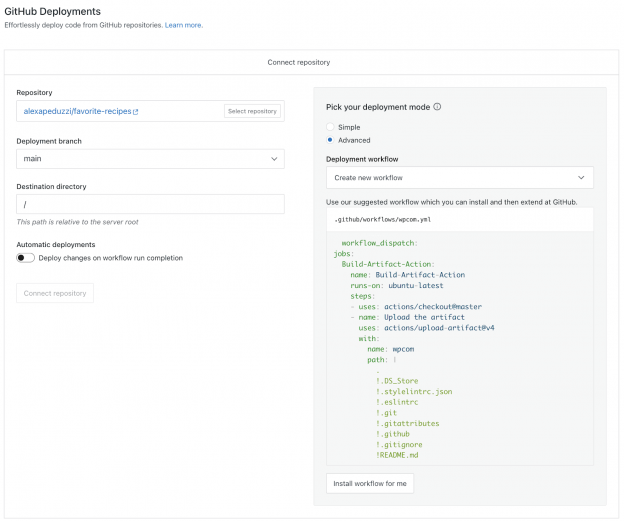
GitHub Deployments help you manage your site’s code in a reliable, predictable, and automated way using version control instead of older or manual mechanisms, such as FTP or SSH tools. In its simplest form, it doesn’t require a workflow file like our previous GitHub integration, which relied on a GitHub action; instead, you can connect and deploy in just a few clicks, all within your WordPress.com dashboard.

This is a welcome change for developers who want to simplify their code deployment process and migrate away from the manual operations and error-prone nature of SFTP and SSH transfers. 

GitHub Deployments also allows you to connect multiple repositories to a single site, encouraging code reusability between the sites you manage. Want to deploy a plugin or theme to multiple sites with a single branch push? Have at it! Want to manage your entire site’s code from a GitHub repository? We’ve got you covered!

2. Run checks and tasks

GitHub Deployments also gives you the power to process files and run tasks before transferring the files to your WordPress.com site through GitHub workflows. This helps ensure that all team members publish code following your chosen patterns and expectations, for example. 

If that’s your thing, you can install Composer dependencies and run any command supported by GitHub actions prior to sending any code updates to your site. Find a few of our favorite workflow recipes here.

Three cheers for unified, well-written code!

3. Deploy the way you want

You can adjust the deployment settings for each repository, giving you complete control over how your code is shipped.

You can choose to automatically deploy changes to your WordPress.com site as soon as code is committed to your repository, or you can request deployments manually. Manual deployments give you the most control over when your code changes are pushed live, as you’ll use the GitHub Deployments interface to trigger a deployment. We recommend manual deployments if you don’t want to use a staging site.
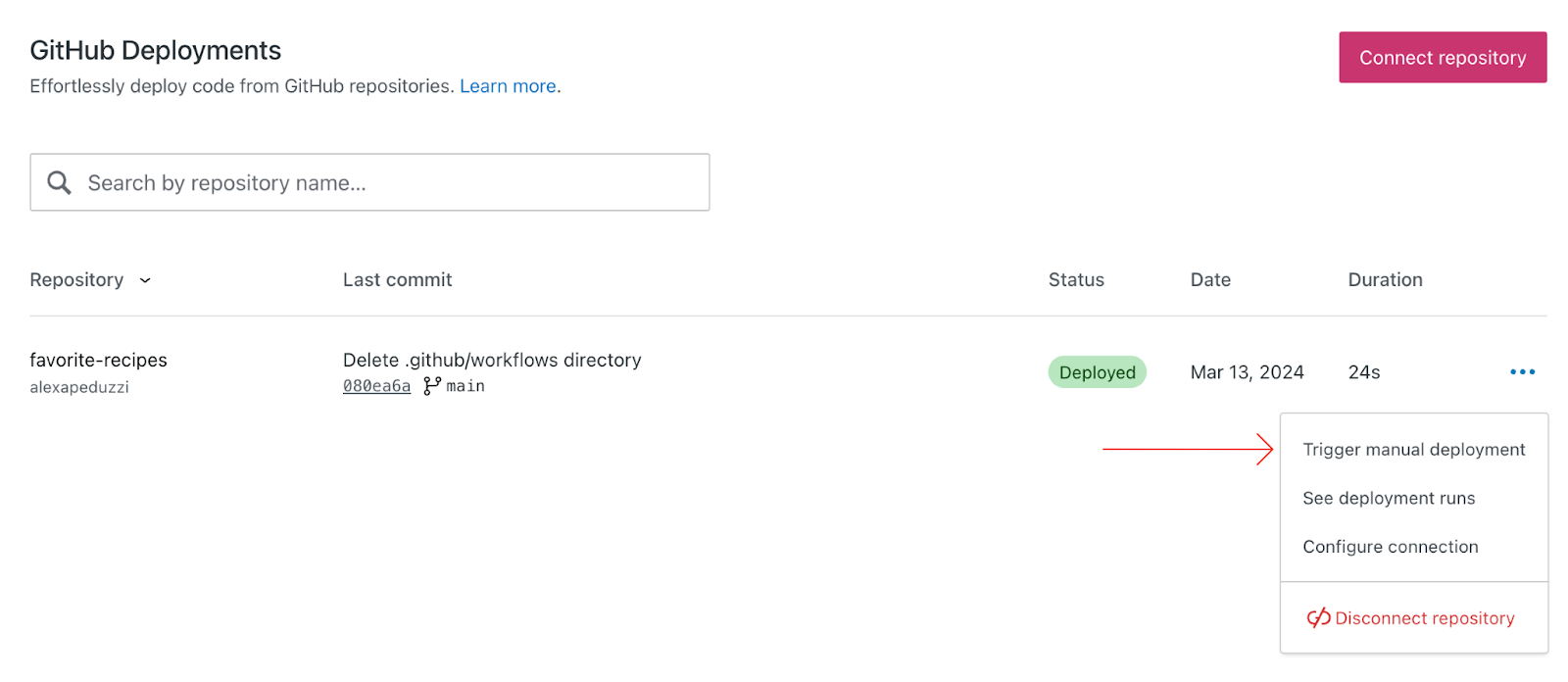
The repository listing for WordPress.com's GitHub Deployments with a red arrow pointing to the repository option menu item 'Trigger manual deployment'

In general, automatic deployments are not recommended for live production sites, as any changes to the code in the repository are automatically deployed from GitHub to the live site. Instead, you may decide to automatically deploy first to a staging site and then sync the staging site to production once you’re ready.

That said, choose your own adventure and deploy on your own terms.

Do your thing, and we’ll handle the rest

Development on WordPress.com has never been easier. Say goodbye to manual deployments and hello to more efficient collaboration, streamlined version control, and the peace of mind that comes with knowing your project data is secure.

Get instant access to our new GitHub Deployments with a Creator or Entrepreneur plan (did you know we have a 14-day refund policy?).

Ready to try GitHub Deployments out for yourself? Click here to start deploying, and learn more by reading our developer documentation.


Major kudos to the GitHub Deployments team on this launch! Paulo Trentin, Jeroen Pfeil, Kenroy Mcleish, Mike Kelly, Javier Arce, Jeff Sanquist, Alexa Peduzzi, Jeremy Anderberg, and our beta testers.

Te damos la bienvenida al wp-admin más potente

Como adelantó Matt Mullenweg, CEO de Automattic, en una entrada de blog en enero: el equipo de WordPress.com está trabajando duro para mejorar la experiencia para los desarrolladores. Mejorar lo que ves en el escritorio de WordPress.com cuando inicias sesión es uno de nuestros principales objetivos.

Hoy nos alegra poderte presentarte un wp-admin más potente que estará disponible pronto en todos los sitios de los planes Creator y Entrepreneur. Sigue leyendo para saber cómo conseguir acceso anticipado.

Más que una vuelta a los orígenes

Durante muchos años, la vista predeterminada de WordPress.com ha sido una versión modernizada y más amigable del escritorio clásico de WordPress. Por aquí llamamos a esta interfaz «Calypso». Tiene un diseño sencillo para gestionar páginas y entradas, editar tu perfil, acceder a recursos y consejos para ayudarte a empezar o a seguir desarrollando tu web, y mucho más.

Aunque la interfaz de Calypso es perfecta para algunos usuarios, hemos oído que a algunos desarrolladores os gustaría poder acceder fácilmente al escritorio clásico de WordPress. Así que lo hemos hecho posible añadiendo una opción para elegir el escritorio de wp-admin como vista predeterminada.

Nuestro objetivo es ofrecer todos los recursos a nuestros usuarios más experimentados (aquellos con los planes Creator o Entrepreneur) y que puedan sacarle el máximo partido a WordPress. Esta actualización incluye:

  • Más flexibilidad: adapta la interfaz para que se ajuste perfectamente a tu forma de trabajar.
  • Una interfaz conocida en el mundo de WordPress: disfruta de la interfaz de siempre con todas las opciones que se esperan en otros alojamientos de WordPress.
  • Gestión de alto nivel de las webs más complejas: administra sitios sofisticados y proyectos de clientes fácilmente.

Aunque por ahora el lanzamiento solo afecta a los suscriptores de los planes Creator y Entrepreneur, nuestro compromiso se extiende a todos los usuarios de WordPress.com. Estamos deseando poder hacer llegar estas funcionalidades a todo el mundo.

Apúntate a la lista de acceso anticipado

Para tener la opción de acceder a la interfaz de wp-admin que ya conoces y tanto te gusta, apúntate a nuestra lista de correo.

Y no te pierdas las próximas actualizaciones, que incluyen algunos cambios en el menú y la navegación que seguro que te interesan.

WP Cloud impulsa el futuro de WordPress

La infraestructura básica de las webs que tanto nos gusta crear y gestionar es crucial para garantizar un entorno seguro, rápido y estable. Aquí es donde entra WP Cloud.

En Automattic, la empresa detrás de WordPress.com, desarrollamos WP Cloud porque queríamos una plataforma en la nube creada desde cero específicamente para WordPress. Alojamos millones de webs en todo el ecosistema de WordPress y nos hemos convertido en uno de los principales proveedores de servicios en la nube.

En WordPress.com, la infraestrucura de WP Cloud hace funcionar todas las webs de los planes Creator y Entrepreneur.

Estamos muy orgullosos de WP Cloud: tiempo de actividad del 99,99 %, escalado automático, detección de fallos y un sistema de redundancias a prueba de errores. Todo esto para que puedas dedicar tu tiempo a crear tu negocio o dar servicio a tus clientes, en lugar de preocuparte por la posibilidad de que un pico de tráfico pueda hacer caer tu web.

WP Cloud es además increíblemente seguro. Incluye protección DDoS, análisis de malware, escaneo anti-spam, certificados SSL, cifrado TLS del tráfico y copias de seguridad en tiempo real.

Estamos seguros de que no hay una plataforma en la nube mejor que WP Cloud para tu web de WordPress. Y no somos los únicos que lo pensamos.

Hoy, WP Cloud anuncia que Bluehost (uno de los hosting web más importantes del mundo) lanza un nuevo producto que utiliza la infraestructura de alto de nivel de WP Cloud.

Bluehost Cloud incluye la excelencia técnica de WP Cloud con un montón de opciones para alojar múltiples webs. Además, como todos los sitios de WordPress.com, cuenta con el rendimiento y la seguridad de Jetpack integrados.

Con el lanzamiento de esta colaboración, puedes encontrar el plan Bluehost Cloud en la página de planes de WordPress.com, para que puedas elegir lo que más se adapte a las necesidades de tu negocio. Como colaboradores en el ecosistema de WordPress, estamos muy contentos de que Bluehost haya elegido WP Cloud para este nuevo lanzamiento.

Disfruta de todas las opciones que ofrece WP Cloud con los planes Creator, Entrepreneur o Bluehost Cloud.

Más control sobre el contenido que compartes

Actualmente los usuarios no disponen de muchas opciones para controlar cómo se utiliza su contenido para el entrenamiento de la inteligencia artificial, y queremos cambiarlo. Hemos lanzado una nueva herramienta que te permite evitar que se comparta el contenido público de tus blogs con terceros, incluidas las plataformas de IA que utilizan dicho contenido para entrenar a sus modelos.

La realidad es que las empresas de IA están recolectando contenido por todo Internet de muchas formas y con diferentes propósitos. Solo colaboraremos con aquellas empresas de inteligencia artificial con las que podamos tener relaciones productivas, y estamos trabajando para que tengas una manera fácil de controlar el acceso a tu contenido.

También nos queremos adelantar a las leyes que se están proponiendo por todo el mundo. La Ley de IA de la Unión Europea, por ejemplo, otorgará a cada persona más control sobre si esta nueva tecnología utiliza sus contenidos y cómo lo hace. Apoyamos este derecho independientemente de la localización geográfica, así que hemos incluido una opción para no permitir que se comparta tu contenido y estamos trabajando para que tengas todo el control posible sobre el contenido que se utiliza.

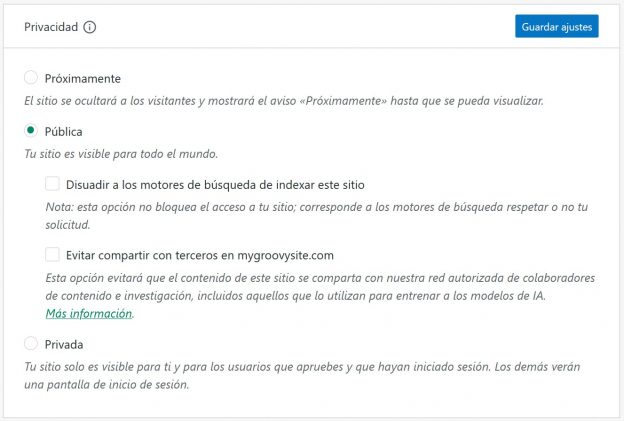
Estos son los pasos para no permitir que se comparta tu contenido:

La nueva opción se encuentra en Ajustes → Generales → sección de Privacidad. También puedes hacer clic aquí: https://wordpress.com/settings/general.

  • Ve a los ajustes de privacidad de cada uno de tus sitios y activa la opción «Evitar compartir con terceros».
  • Ten en cuenta que si ya has seleccionado en los ajustes la opción de disuadir a los motores de búsqueda de indexar tu sitio, esta preferencia de seguridad se activa automáticamente también en relación a compartir tus datos con terceros.
  • En este documento de soporte puedes encontrar más información.

En WordPress.com ya evitamos la recopilación de contenido por rastreadores de IA y seguiremos haciéndolo, a excepción de aquellos con los que colaboramos. Desde WordPress.com queremos representar a todos nuestros usuarios  y asegurarnos de que hay mecanismos de protección en relación a cómo se utiliza vuestro contenido. Para ello, hemos añadido una opción para evitar que el contenido público de tu web se comparta con terceros. Y nos comprometemos a asegurarnos de que nuestros colaboradores respeten esa decisión.

Este post es una traducción. Puedes leer el artículo original en inglés aquí.

Recién salidos del horno: nuevos temas para WordPress.com (febrero 2024)

El equipo de WordPress.com siempre está trabajando en nuevos diseños para darle vida a tu web. Echa un vistazo a los últimos temas de nuestra biblioteca, incluyendo increíbles opciones para gamers, escritores y creadores de todo tipo.


Spiel

Este tema de estilo revista está diseñado para blogs de videojuegos, pero es lo suficientemente versátil para funcionar perfectamente en casi cualquier tipo de imperio multimedia emergente. En un diseño de blog clásico, hemos combinado la moderna tecnología de WordPress (bloques, estilos globales, etc.) con una estética nostálgica que recuerda a los primeros días de Internet.

Haz clic aquí para ver la versión de demostración de este tema.


Allez

Los deportes siempre levantan pasiones, tanto para los aficionados más entusiastas como para los espectadores ocasionales. Allez es el tema ideal para documentar esa parte de ti. Diseñado especialmente para deportes, el diseño, los estilos y los patrones que utiliza resuenan con este mundillo. Pero como siempre, WordPress es tan versátil que si te gusta el diseño general de Allez, lo puedes personalizar fácilmente para que se adapte a cualquier proyecto.

Haz clic aquí para ver la versión de demostración de este tema.


Strand

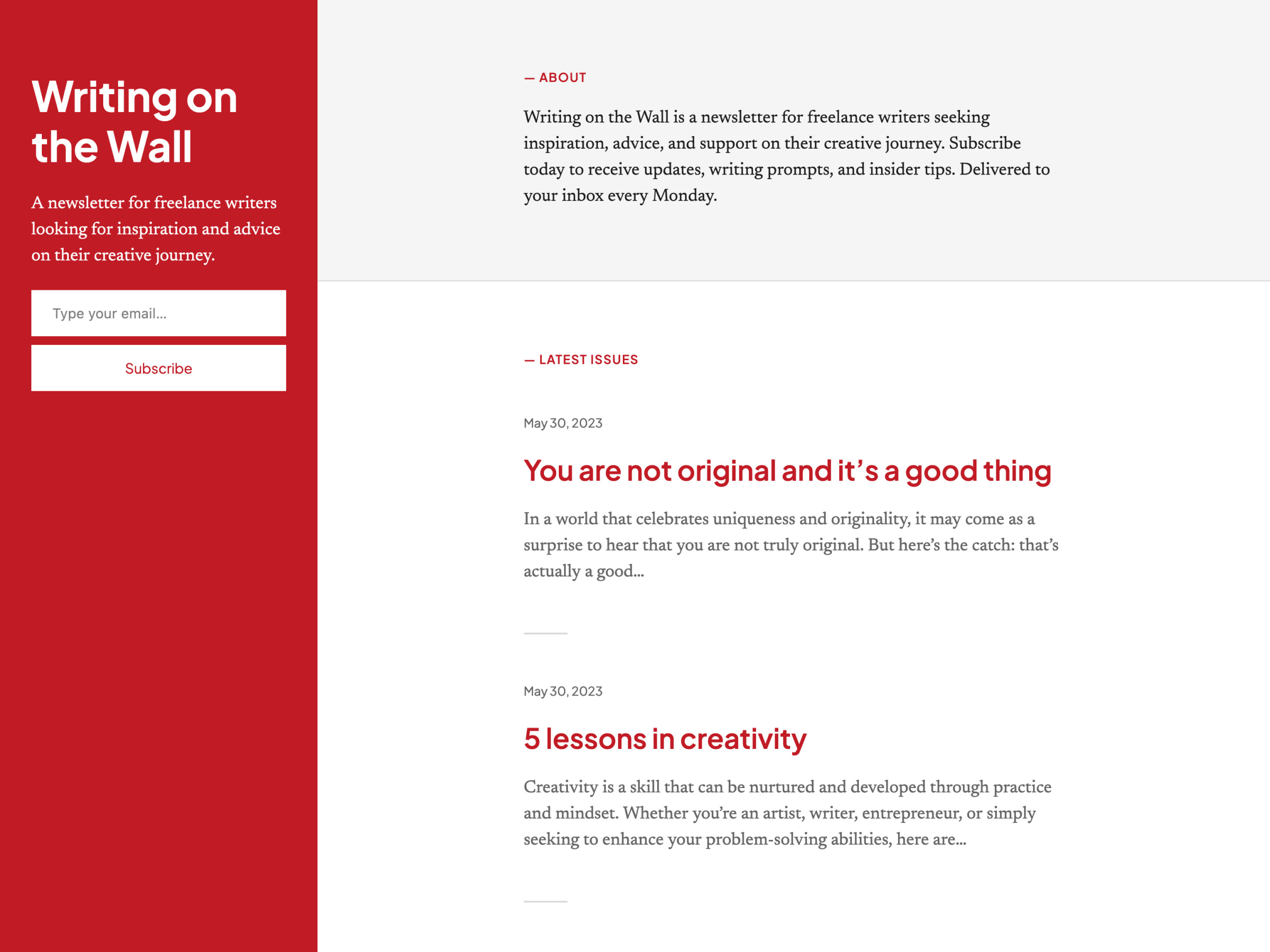
Strand es un tema sencillo para blogs y newsletters con un diseño separado en dos áreas, similar a Poesis. Hemos colocado un formulario de suscripción a la newsletter en la columna fija de la izquierda para que siempre esté visible. Es un diseño simple, pero que nos gusta especialmente para escritores minimalistas que quieran darle más énfasis a las palabras que al estilo visual.

Haz clic aquí para ver la versión de demostración de este tema.


Bedrock

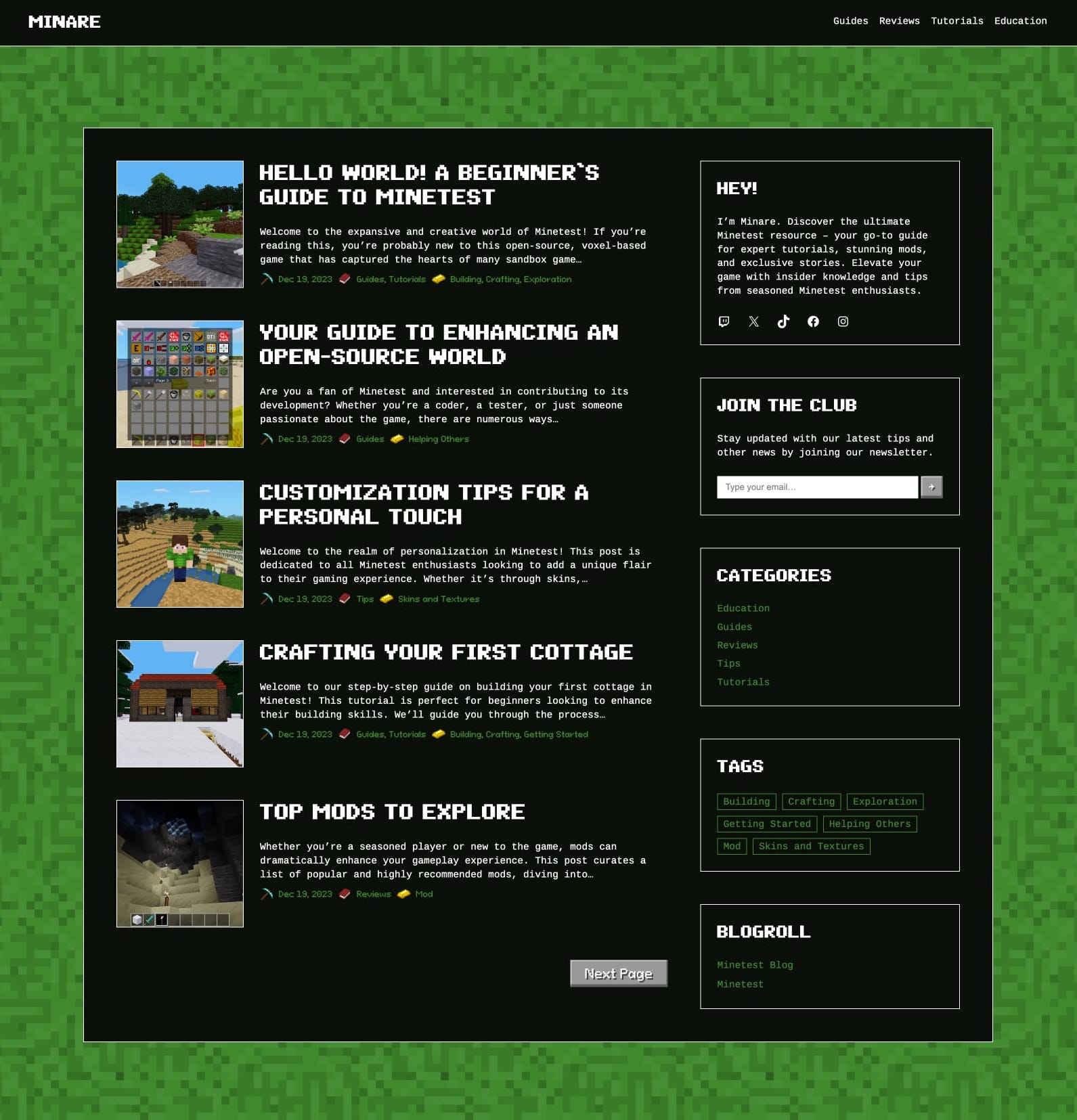
Inspirado en los emblemáticos mundos de Minecraft y Minetest (un motor de videojuegos de código abierto), este tema para blogs ha sido diseñado para replicar la experiencia inmersiva que ofrecen estos juegos. Además de condensar la esencia de los reinos virtuales, también queríamos que el tema recordara a la estética de Minecraft, independientemente del contenido.

En esencia, Bedrock es un homenaje nostálgico al diseño clásico de los blogs, decorado con la característica textura de «mosaico». La barra lateral aparece en todas las páginas y alberga varios elementos de la vieja escuela, como la nube de etiquetas, el blogroll y las entradas recientes, todo con un toque del encanto del juego. Si te llama la atención este tema, no dejes de probarlo.

Haz clic aquí para ver la versión de demostración de este tema.


Nook

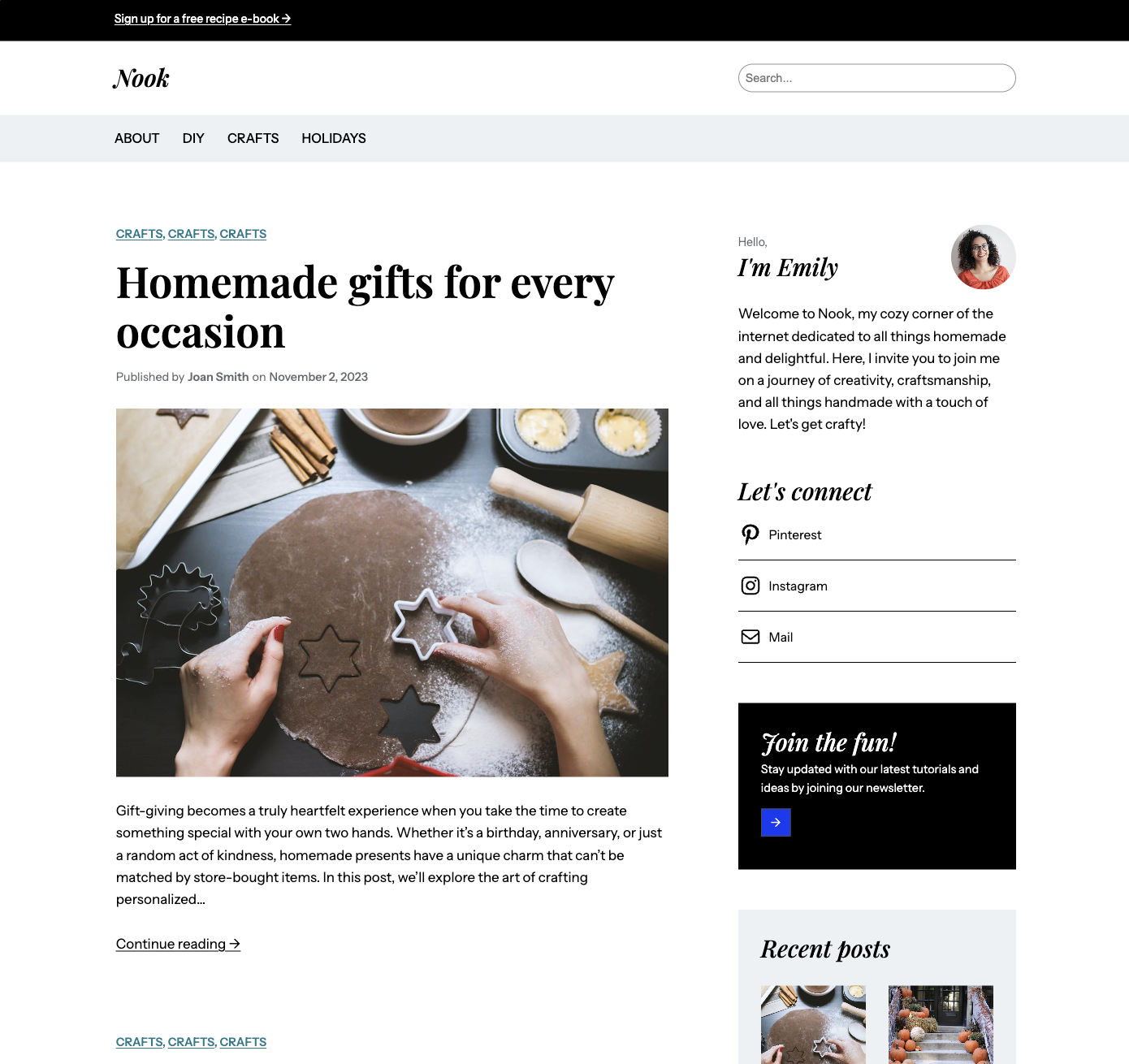
Nook es otro tema para blogs que sirve de lienzo perfecto para tus proyectos de artesanía y bricolaje, recetas y cualquier tipo de inspiración creativa. También se puede expandir fácilmente para añadir productos de pago o cursos. Nuestro objetivo era crear un estilo elegante y atemporal con un toque familiar y hogareño. La tipografía y la paleta de colores tienen elementos de alto contraste que evocan comodidad y confort.

Haz clic aquí para ver la versión de demostración de este tema.


Para instalar cualquiera de estos temas, haz clic en el nombre del tema que te guste y te llevará a la página de instalación. Allí, haz clic en el botón «Activar este diseño». También puedes hacer clic en «Abrir la versión de demostración» y ver una versión del tema en la que puedes desplazarte e interactuar.

Los temas premium son gratuitos para aquellos que tengan un plan Premium o superior. Los temas de pago son productos de terceros y se pueden comprar desde 87 € al año cada uno.

Puedes echar un vistazo a todos nuestros temas en la página «Temas», en la sección «Apariencia» del menú lateral izquierdo del escritorio de WordPress.com. O puedes hacer clic en el botón:

Re-Creating The New York Times’ Website in Under 30 Minutes Using WordPress.com

In this “Build and Beyond” video, Jamie Marsland re-creates The New York Times’ website in less than 30 minutes using WordPress.com. By utilizing mega menus, master layouts, typography controls, and post grids, Jamie shows us what’s possible with the limitless customizations available with WordPress.

When it comes to mega menus, specifically, it’s worth noting that this is a highly complex customization that should only be attempted by WordPress pros and is mainly shown here as a demo of what’s possible. Please read this blog post on the WordPress.org developer blog before embarking on your own mega menu.

To learn more and get started on your own site today, click below:

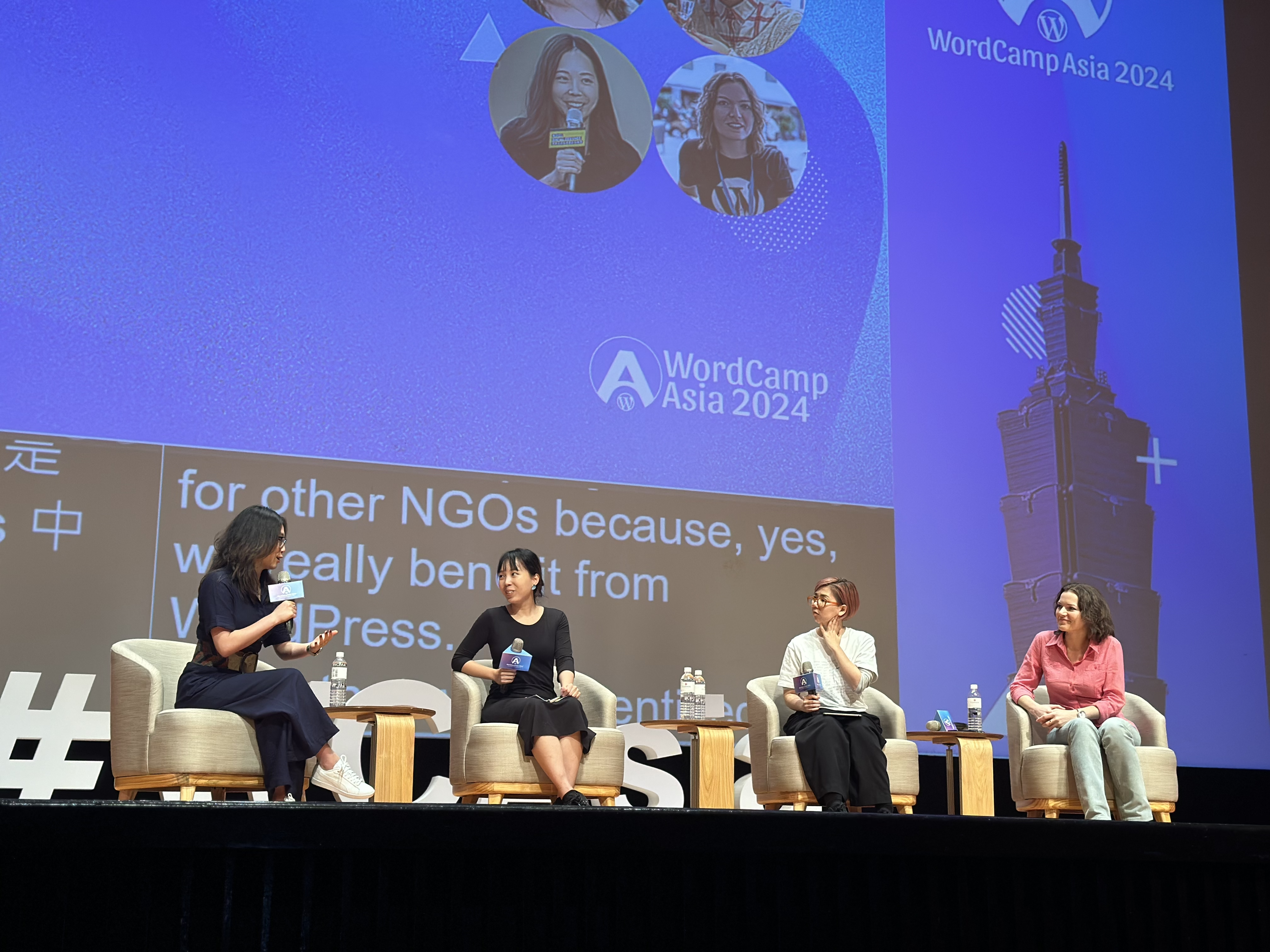
WordCamp Asia 2024: The WordPress Community Comes Together in Taipei

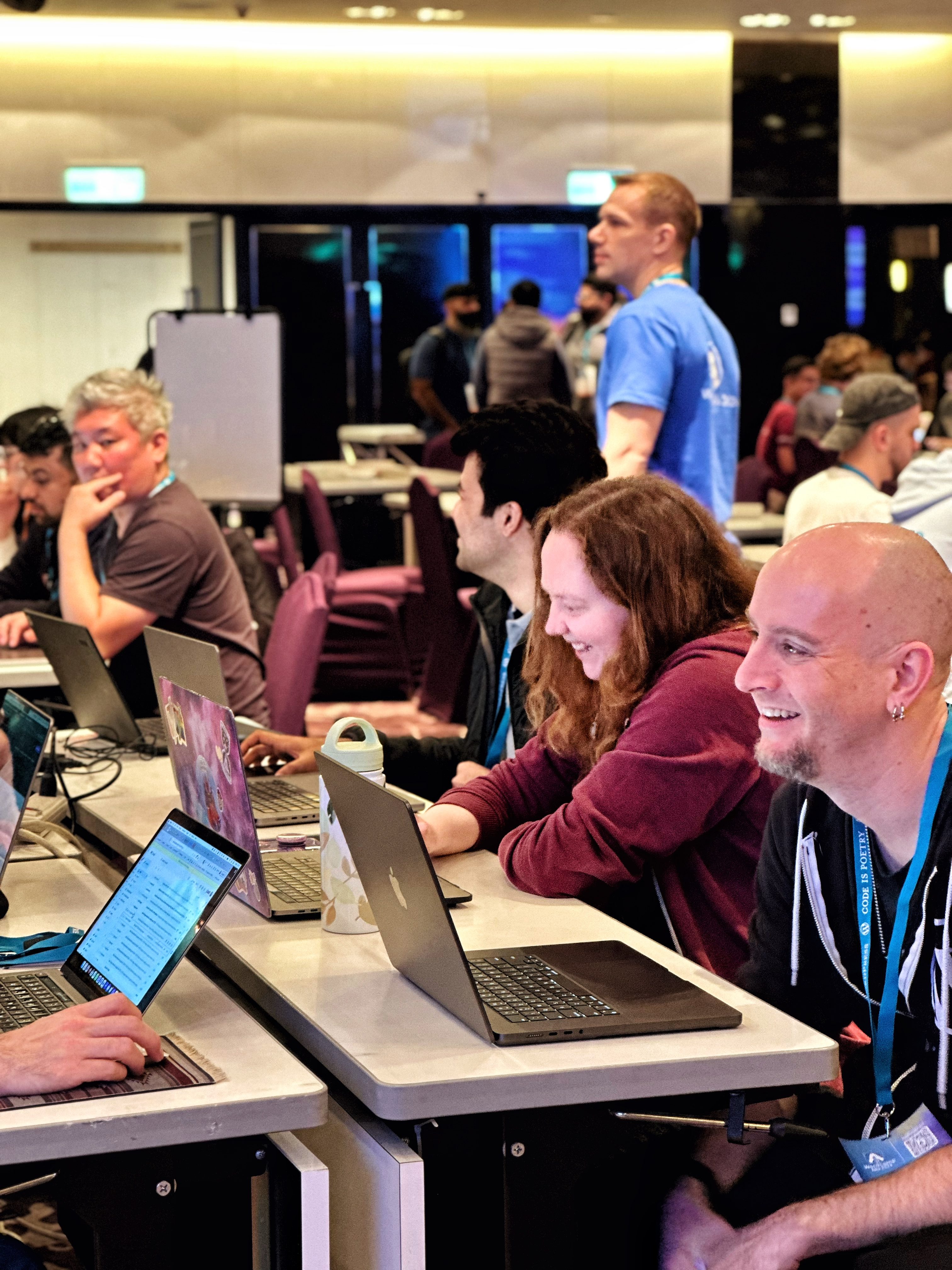
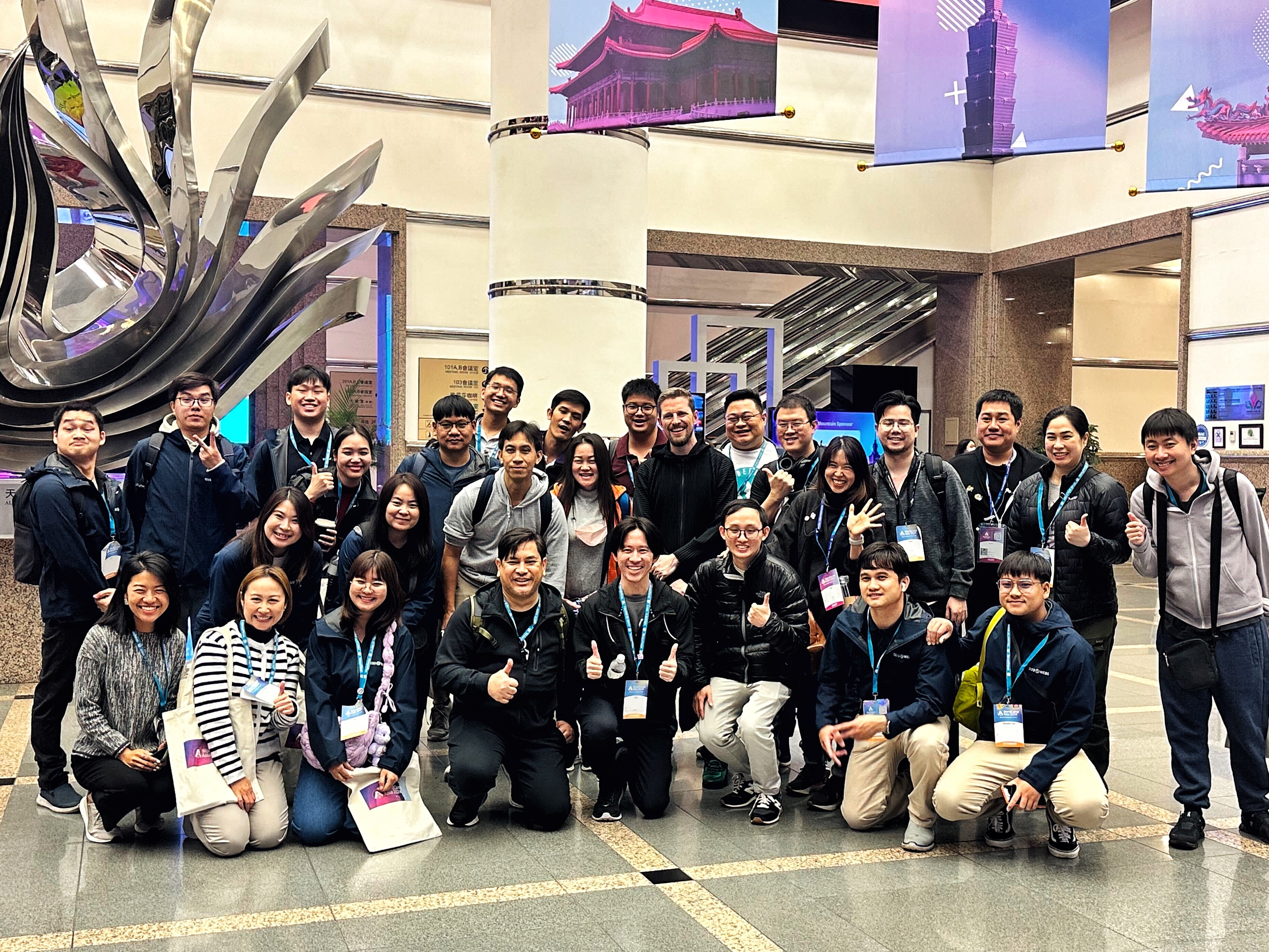
This year’s WordCamp Asia was held in Taipei, the vibrant capital city of Taiwan. Members from WordPress.com joined other Automatticians, as well as around 2,000 other attendees from across 70 countries to connect, learn, build, and give back to the platform that powers millions of top websites across the internet.

The event kicked off with Contributor Day, an opportunity for anyone in the WordPress community, from newcomers to seasoned experts, to get involved and contribute to WordPress. Contributing can mean contributing to code, but it can also mean sharing your expertise in design, offering support in forums, translating content, and much much more. This year’s Contributor Day had a fantastic turnout and it was amazing to see so many folks show up and participate! 

As always, there was a variety of informative and inspiring talks. Some of our favorites included talks about the future of WordPress, the multifaceted nature of design, building and maintaining WordPress sites with AI, achieving efficient workflows with the site editor, and the importance of diversity, equity, inclusion, and belonging in the tech and WordPress communities. If any of these topics pique your interest, you can take a look at the livestream recordings for these and all other WordCamp Asia 2024 talks here

While our colleagues from the WordPress Project, Woo, and Jetpack participated in the event, folks from WordPress.com were also present, contributing, networking, and engaging with the community.

This year we were particularly interested in connecting with developers so that we could better understand their experiences with WordPress.com. Our hosting infrastructure, powered by WP Cloud, is best-in-class, yet the benefits aren’t as well-known in the developer community. To help get the word out about all of our developer-focused features, we’ve recently relaunched our developer site at developer.wordpress.com. Check it out to learn about staging sites, WP-CLI access, and Studio, our upcoming local development environment. 

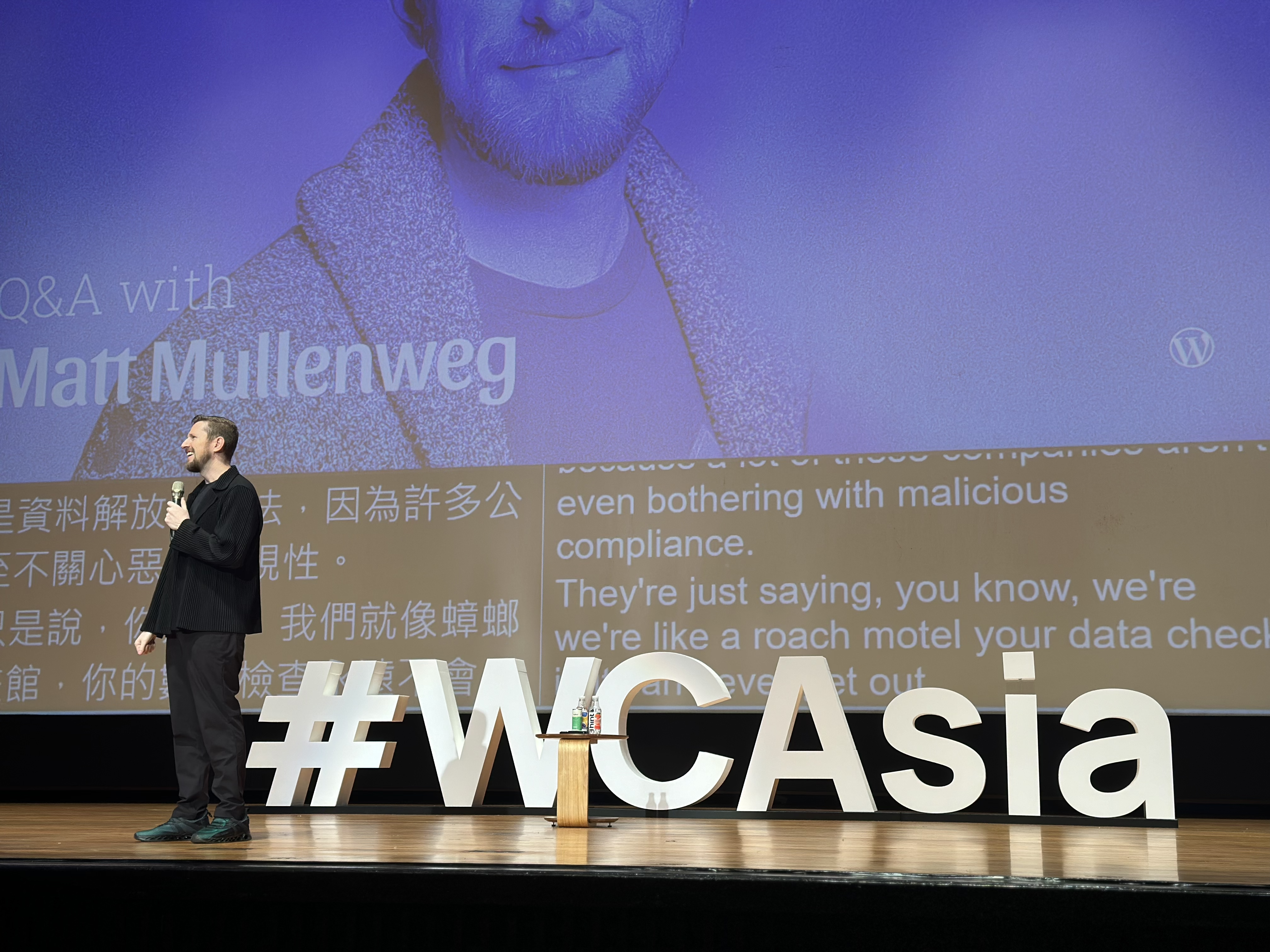
During the anticipated closing Q&A session at WordCamp Asia 2024, Matt Mullenweg, co-founder of WordPress and CEO of Automattic, opened up about his dreams for a web that’s both open and accessible to everyone. He shared how the core principles of open source are not just shaping WordPress but also knitting together a worldwide community of contributors.

That sense of community is something you can definitely feel at WordCamps. Thirty-six percent of attendees at this WordCamp were first-time participants—a testament to the event’s growing appeal and the ever-expanding WordPress community.

During the closing remarks, Matt revealed that State of the Word 2024 will be held in Tokyo, Japan. The lead organizers also revealed the next WordCamp Asia location: Manila, Philippines, in February 2025. With Manila’s rich tapestry of Spanish, European, American, and Asian influences, we’re in for a vibrant mix of culture, cuisine, and community!

But you don’t have to wait until 2025 to start getting involved. There’s a huge number of local and regional WordCamps happening year-round. Head over to https://central.wordcamp.org/ to find one near you. Whether you’re looking to develop your skills, learn something new, network with the community, there’s something for everyone. We hope to see you out there! 

Introducing “Build and Beyond”: A New Video Series From WordPress.com and Jamie Marsland

Jamie Marsland has been preaching the WordPress gospel for over a decade and has trained thousands of people on blocks, plugins, and more. Through his popular YouTube channel and hands-on courses, Jamie provides incredible tutorials and breaks down the most common misconceptions about building with WordPress. 

We’re happy to share that WordPress.com is partnering with Jamie over the next few months to create a series of videos that will show you how to get the most out of your website experience. From exciting new feature announcements to handy tips and tricks to Jamie’s mind-blowing “website re-creations,” we promise you’ll learn something new in every video.  

Starting later this week, you’ll see those videos posted to both our own YouTube channel as well as this blog. Stay tuned!  

WP Cloud Is Powering the Future of WordPress

The foundational infrastructure for the websites you build and manage is crucial for ensuring a safe, secure, fast, and reliable environment. That’s where WP Cloud comes in. 

Automattic, the parent company of WordPress.com, built WP Cloud because we wanted a cloud platform constructed from the ground up just for WordPress. We’ve hosted millions of websites across the WordPress ecosystem and have become one of the most trusted providers in cloud services. 

At WordPress.com, the WP Cloud infrastructure powers all websites on our Creator and Entrepreneur plans

We’re proud of WP Cloud’s 99.999% uptime, automated burst scaling and failure detection, and failover redundancies that allow you to spend time focusing on building your business or serving your clients instead of worrying about whether a traffic spike will crash the site. 

WP Cloud is also incredibly secure. With DDoS protection, malware scanning, anti-spam measures, SSL certificates, TLS traffic encryption, and real-time backups, you’ll have peace of mind from day one. 

We’re confident that there’s no better cloud platform for your WordPress site(s) than WP Cloud. And we’re not the only ones to think so. 

Today, WP Cloud is announcing that Bluehost—one of the largest website hosts in the world—is launching a new product built atop WP Cloud’s best-in-class infrastructure. 

Bluehost Cloud includes all the technical excellence of WP Cloud, with bundled options for hosting multiple websites. Plus, as with all of the sites on WordPress.com, it comes with Jetpack’s highly acclaimed performance and security features built right in. 

To kick off this partnership, we’re showcasing Bluehost Cloud on WordPress.com’s pricing page, so that you can choose the product that best fits your business needs. As fellow supporters of the WordPress ecosystem, we’re glad Bluehost has chosen WP Cloud for this powerful new offering.

Take advantage of these robust WP Cloud solutions with the Creator, Entrepreneur, or Bluehost Cloud plan.

Case Study: Jelly Pixel Studio’s Journey With WordPress.com

Jelly Pixel Studio, a web development agency based in Indonesia, specializes in crafting unique and illustrative websites for clients worldwide. The company serves a wide variety of clients, from small businesses to larger corporations, utilizing WordPress.com as their primary hosting platform due to its exceptional stability, fast performance, and robust features.

Over the years, the agency has migrated numerous websites to WordPress.com and has seen consistent uptime and improved efficiency, saving both time and money. The agency’s founder, Andika Purnawijaya, better known as Dika Fei, cites WordPress.com as the magic solution that helped solve many hosting challenges for the agency’s clients.

Let’s explore a bit more about Jelly Pixel and how WordPress.com helps keep their clients happy.

Dika’s path to web development

Dika Fei embarked on his web development journey right after university, learning and mastering IBM’s WebSphere. His first interaction with WordPress.com came when he joined Codeable to work with various clients whose sites were hosted on the WordPress.com platform. Dika saw the immense value in WordPress.com and adopted it for the majority of his projects.

Jelly Pixel Studio was born out of a failed startup venture by Dika and three of his friends from college. After their initial attempt at creating something similar to Shopify for the Indonesian market didn’t work out, the team decided to channel their expertise into a highly successful web development agency. When choosing a platform, they settled on WordPress due to its simplicity and intuitiveness.

The team later branched out to form a second agency, WP Stronk, which handles subscription-based web maintenance and content entry.

When asked if the agencies focused on any specific niche, Dika said, “YES! Jelly Pixel is exceptionally skilled at creating illustrative websites with subtle scrolling animations. Our websites leave a lasting impression even after you close the tab.”

The impact of WordPress.com

WordPress.com has been instrumental in helping Jelly Pixel Studio streamline its operations and deliver outstanding services to clients. With a mix of projects in maintenance and those being actively developed, Dika and his team of seven, or “the magnificent seven” as they like to call themselves, have benefited greatly from the platform’s robust features and top-notch performance.

The Jelly Pixel Studio team

WordPress developers and agencies are no strangers to the perils and pitfalls of hosting. But WordPress.com solves those problems for Jelly Pixel Studio clients:

What I love about WordPress.com is its exceptional stability and blazing-fast performance, regardless of your setup. Even with other managed hosting providers, you often need to be mindful of  various settings such as: cache parameters and PHP workers. However, with WordPress.com, everything just works seamlessly. It’s a true “set it and forget it” experience

As long as your site is hosted on WordPress.com, you can rest assured that it won’t go down and it won’t slow down, no matter the traffic. I have no idea how you accomplished it, but it’s absolutely AMAZING! 

Literally magic

The team considers WordPress.com to be a good fit for their clients. Why?

You have amazing support, and your infrastructure is LITERALLY MAGIC. We have monitored our clients’ uptime, and 100% is a number we often see. How is this even possible? “Amazing” would be an understatement. You have saved me from a ton of urgent calls at night.

Jelly Pixel Studio believes WordPress.com has one well-kept secret:

I firmly believe that WordPress.com is the best hosting option for WooCommerce, particularly those with high traffic. 

He thinks this is a missed opportunity for many freelancers and agencies who may not have considered using WordPress.com for their hosting clients. He shares this example:

I have a client on a different host. They get HUGE traffic. Every time they have a sale, they need to purchase a package upgrade and I have to constantly monitor their ad parameters to ensure proper caching. With the way WordPress.com works, all of this would be seamlessly handled out of the box.

He adds:

Unfortunately, the knowledge of WordPress.com as a highly stable WooCommerce hosting solution seems to have been lost over time. It almost feels like a well-kept secret! 

The verdict

Dika and his team at Jelly Pixel Studio view WordPress.com as a valuable partner in their web development journey. Dika credits the platform for providing peace of mind, leading to a happier and more productive work environment for his team, as well as clients who no longer complain about their site’s performance. He looks forward to further cooperation with WordPress.com and hopes for the continued evolution of the platform’s capabilities.

At the heart of his work, Dika stands by this quote from Victor Frankl:

“For success, like happiness, cannot be pursued; it must ensue, and it only does so as the unintended side-effect of one’s personal dedication to a cause greater than oneself.”

This approach is echoed in the success story of Jelly Pixel Studio and WP Stronk, marking the agencies as businesses of kindness, dedication, and commitment to problem-solving.

The power of hosting with WordPress.com

WordPress web design and development agencies are discovering the power of WordPress.com hosting and the benefits it offers their clients. With full-stack performance, robust security, and developer-friendly features, WordPress.com provides agencies with a platform they can confidently recommend to their clients.

If you’re interested in getting access to the tools and features on WordPress.com that can support your development process, click here to enable our “I am a developer” setting on your WordPress.com account.

Finally, if you’re in search of an agency specializing in illustrative websites and CRO (Conversion Rate Optimization), Jelly Pixel Studio can help you. For web and content maintenance, check out WP Stronk for their comprehensive services.