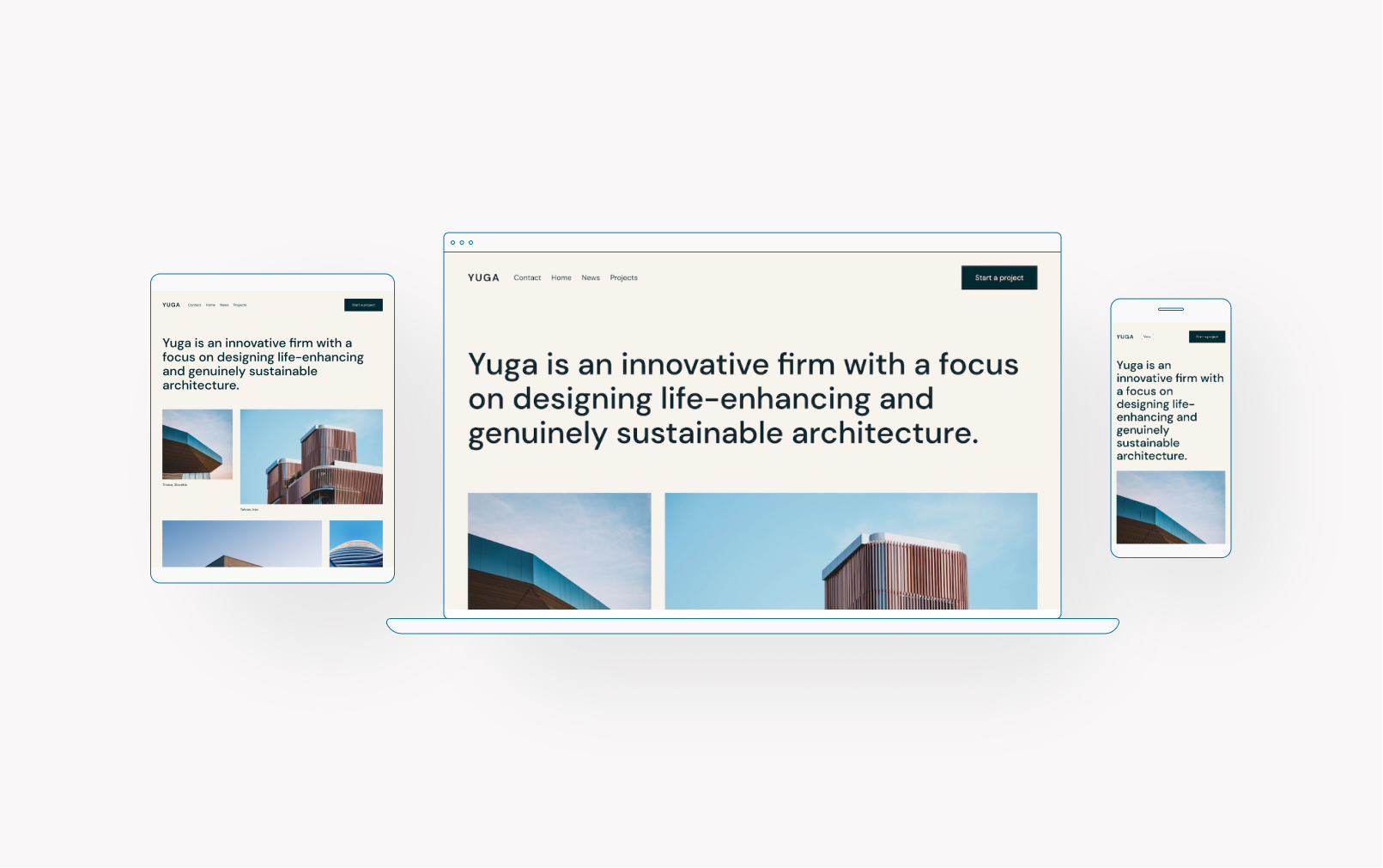
Hot Off the Press: New WordPress.com Themes for July 2023

The WordPress.com team is always working on new design ideas to bring your website to life. Check out the latest themes in our library, featuring beautiful new options with bloggers and creators in mind.


Kigen

One of the meanings of the Japanese word kigen is “the origin.” As such, this theme offers a biographical representation of your work.

Kigen’s simple portfolio design is straightforward: The front page has a gallery at the top, followed by a column block with links to social media as well as space for your “About” or “Bio” content. The font, Newsreader, conveys a classical sense while maintaining an authoritative feel.

We’ve added some playfulness to the bottom border, which is an easily changeable or removable pattern.

Click here to view a demo of this theme.


BSoJ

BSoJ is a simple blog theme inspired by the infamous “Blue Screen of Death” that would appear on the Microsoft Windows operating system after a fatal error. This version gives that screen a far more joyful vibe.

The original Blue Screen of Death.

While our design keeps the iconic white text on blue, it uses a livelier font pairing of Anonymous Pro and Josefin Sans. The font sizes are intentionally small (equivalent to 14px for body text) and sit on a narrow column (400px width max).

If you’re feeling like adding some classic ’90s nostalgia to your online footprint, consider the BSoJ theme.

Click here to view a demo of this theme.


Optimismo

Inspired by a UK rave party flyer in the late ’80s, Optimismo is a simple blog theme with a bold aesthetic. The theme features a somewhat unusual homepage that displays the five latest blog post titles, along with a large headline and the site title. We usually go with left-aligned designs, but wanted to break our own rules a bit and went center-aligned with Optimismo.

If you want to make a bold splash with your blog, this is a great theme to use.

Click here to view a demo of this theme.


Lineup
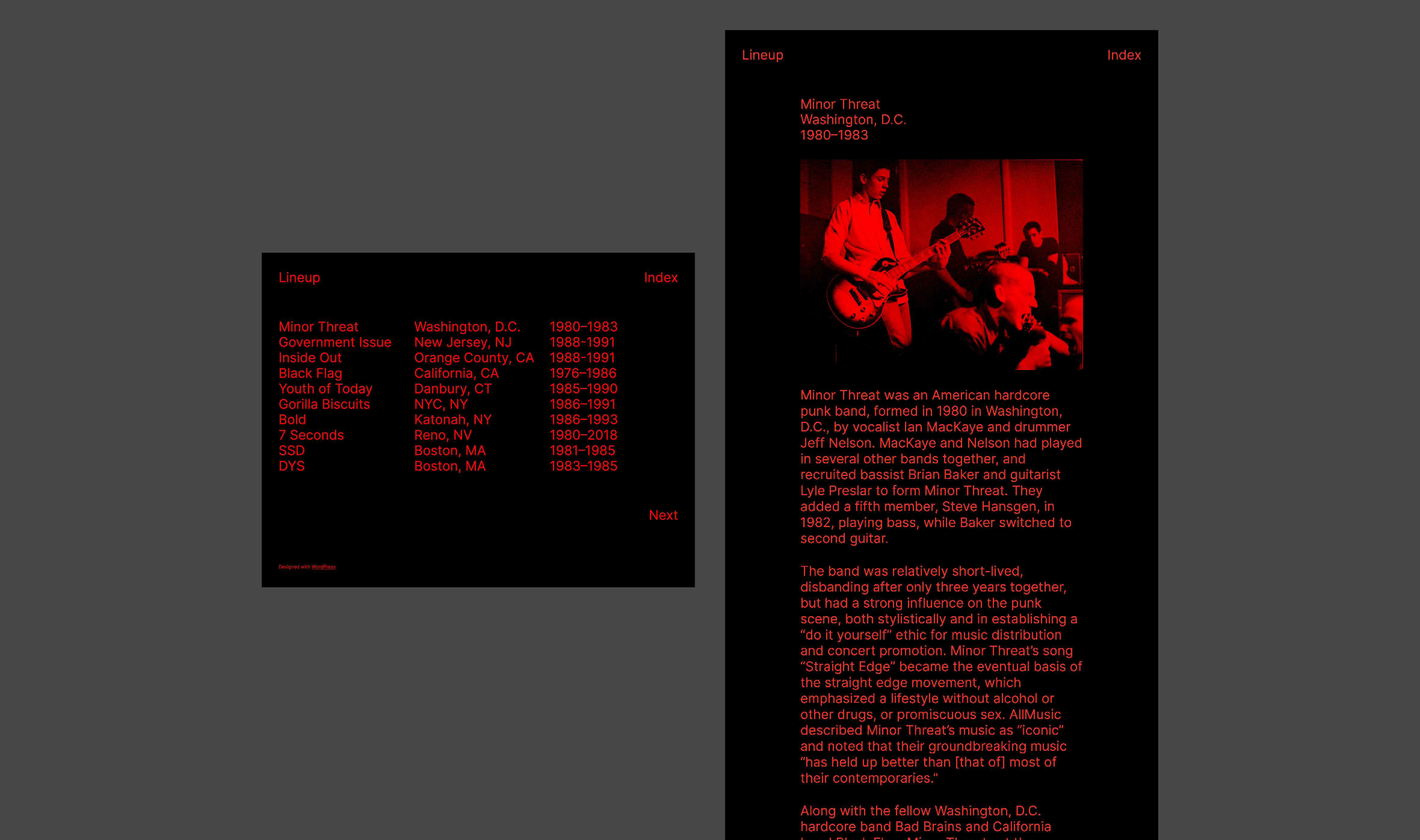
Lineup is a ’90s D.I.Y. fanzine-inspired theme that lists entries with bold typography and color. Our designer on this theme noted that he was really into hardcore punk in his younger days and loved reading about them in fanzines. They were raw, crude, and often printed with a single color.

Lineup only uses black and red, and most of the text is intentionally the same large font size. Because of that, the default content width is wider than usual (940px max). Additionally, all images will appear with a duotone filter.

This theme probably isn’t for everyone, but if punk rock is your aesthetic, Lineup is perfect.

Click here to view a demo of this theme.


Jinjang

Jinjang is a blog theme with a split 50:50 layout, inspired by the Chinese philosophical concept of yin-yang. It’s stark and bold and uses a large font throughout the theme.

The black left column is sticky—making the navigation always visible—so only the right column scrolls. It’s a rather striking and versatile design, if we don’t say so ourselves.

Click here to view a demo of this theme.


To install any of the above themes, click the name of the theme you like, which brings you right to the installation page. Then click the “Activate this design” button. You can also click “Open live demo,” which brings up a clickable, scrollable version of the theme for you to preview.

Premium themes are available to use at no extra charge for customers on the Premium plan or above. Paid themes are third-party products that can be purchased for $79/year each.

You can explore all of our themes by navigating to the “Themes” page, which is found under “Appearance” in the left-side menu of your WordPress.com dashboard. Or you can click below:

Make Your Site Faster With Our Global Edge Cache

No matter your website’s goals, speed and efficiency are key. The bottom line is that you want your website to be fast and accessible for visitors, no matter where they are in the world.

WordPress.com’s Global Edge Cache (pronounced like “cash”) makes your site load faster for visitors around the world by taking advantage of our global network of data centers. This feature is always enabled on Free, Personal, and Premium sites. For our Business and Commerce sites, you can now manage the Global Edge Cache settings from the “Hosting Configuration” page.

What is global edge caching?

Say your website is hosted at one of our data centers in Amsterdam and a visitor from Cape Town wants to access it. The request from the visitor has to travel halfway around the world and back again to be fulfilled—that is, load the site on their device. 

Through some backend technical wizardry, our Global Edge Cache means that the request only needs to travel to Johannesburg and back, saving your visitor tens or even hundreds of milliseconds. It may not seem like much, but when you’re online, every millisecond counts. 

In short, enabling this caching feature brings your content closer to your visitors, wherever they might be. This means faster load times, less waiting, and a better overall experience. And as we all know, a happy visitor is more likely to become a loyal customer or follower.

Speed up your site with three simple steps

The WordPress.com Global Edge Cache is always enabled for sites on Free, Personal, and Premium plans. On a Business or Commerce site, you can enable Global Edge Cache from the Hosting Configuration page.

Here’s how to do it: 

  1. From your dashboard, go to Settings → Hosting Configuration.
  2. Scroll down to the “Cache” module.
  3. Click the toggle for  “Enable global edge caching for faster content delivery.”

Once you click that toggle, you’re all set! 

Build your future on WordPress.com

Many hosts charge extra for this kind of edge caching, or require integration with a third-party provider. On WordPress.com, global edge caching is included on every plan, without any bandwidth restrictions.

This is just one more reason why WordPress.com stands out as the premier managed WordPress host. Be it staging sites, SSH and WP-CLI access, or unified site management, we’re always working on new tools to make WordPress.com an essential component of your development workflow. 

What other features would you like to see? How can we make WordPress.com an even more powerful place to build a website? Feel free to leave a comment or contact our friendly support team. And be sure to follow our develop blog to stay up-to-date with everything we’re doing to make your behind-the-scenes experience even better. 

Introducing Footnotes, Details Block, and Writing Flow Improvements

The team at WordPress is always working to enhance your writing and publishing experience, whether adding brand-new features or fixing bugs and minor inconveniences. The latest round of updates includes a feature you’ve long been asking for, a new block, and a few improvements to the general flow and convenience of publishing. 

Let’s take a look! 

Hide content with the new Details Block 

The new Details Block features a drop-down arrow that reveals hidden information when clicked. This block provides a way to hide content that some readers might not want or need to see — detailed event information, fine print notices, methodology or research notes, spoilers for books and movies, even the punchline to a joke. It’s basically a way for readers to opt-in to viewing some bit of content. 

We’ve been using the Details Block internally at WordPress.com for ages, and we’re excited that it’s now been brought outside our digital office walls. 

Source your work or add context with footnotes

You’ve been asking for footnotes, and we’re glad to let you know that this feature is now available in the editor! 

To add a footnote: 

  1. Click the small “More” arrow in the action bar that appears while editing a post/page, just to the right of the link icon.
  2. Select “Footnote” at the top. 
  3. From there, your cursor will automatically move to the footnote for you to add a reference or comment. 

Improve your writing flow with these small changes 

In addition to the new Details Block and Footnotes function, we’ve made a few small improvements to the overall writing flow that will make your writing and editing a bit smoother. 

“View post” button added 

New "View Post" button added to top toolbar of the WordPress Gutenberg editor.

It used to take multiple clicks from the editor to view published posts or pages. This inconvenience has been remedied with a new button at the top of the editor. When you click it you’ll be taken to the published post/page in a new tab. 

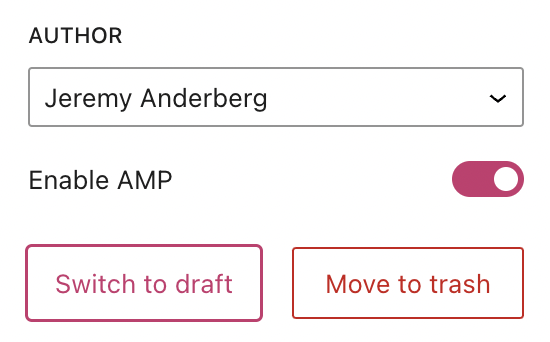
“Switch to draft” button moved 

"Switch to draft" button shown next to the "Move to trash" button on the right sidebar of the WordPress Gutenberg editor.

This button has been placed next to the “Move to trash” button on the right sidebar. When you click “Switch to draft,” a confirmation box will appear asking you if you’re sure about un-publishing the post/page. 

“Preview” button enhanced 

The preview button has been streamlined and enhanced so that the icon displayed matches the device you’re previewing. “Desktop” mode, the default, displays a laptop icon while “Tablet” and “Mobile” display those respective devices. 

Are there other features that would your writing, editing, and publishing experience even better? Let us know in the comments!

Upcoming Webinars: Discover the Power of Custom Headers

Few things command as much attention from your website visitors as the header. Beyond providing a practical spot for your logo and page navigation, it sets the tone for your entire site. With quality design and precise calls-to-action, it will guide users, improve conversions, enhance engagement, and optimize their journey through your site.

With the new Site Editor, anyone can easily create a stand-out header without writing a single line of code. Whether you’re a business owner or a passionate blogger, this webinar will empower you to create headers that represent your brand and resonate with your audience.

During this live demonstration, our experts will cover everything you need to know about customizing your site header:

  • Learn how to select, customize, and replace header template parts in the Site Editor
  • Discover how you can easily add and edit your site title, logo, social media links, a search bar, and other blocks in your custom header
  • Gain confidence in adding and customizing menus for site navigation

Attending this session is free and concludes with a live Q&A, so come prepared with your questions. If you aren’t able to attend any of the three sessions, we’ll send out a recording afterwards. So be sure to register below:

Don’t miss our other July webinars

We’ve arranged a series of engaging webinars this month, introducing you to the dynamic features of the WordPress Site Editor and the critical role a custom domain plays for your site. Both sessions aim to provide the tools required to elevate your WordPress.com site to new heights.

Mastering Custom Domains

Create a distinct online presence that reflects your brand and distinguishes you from competitors. Join us as we guide you through finding, registering, and linking a custom domain to your WordPress.com site. You will also gain a better understanding of how to set up a domain-specific email address and its consequential effect on increasing your email open rates.

Site Editor vs. Page Editor: Editing your entire site in WordPress

In this session where we’ll guide you in customizing every element of your WordPress site, from top to bottom. With our user-friendly Site Editor tools, you can personalize your entire website without needing coding experience!

Join us for our WordPress.com live webinars, carefully crafted with both beginners and seasoned site owners in mind. All our sessions are free to attend and conclude with a lively Q&A session, so you can engage directly with our expert Happiness Engineers.

Happiness Engineers: The Secret Sauce for WordPress.com’s Stellar Support

Let’s dive into the world of WordPress.com support, where one particular group of superstars is making all the difference: our expert Happiness Engineers! 

In today’s post, we’ll explore how these incredible humans make WordPress.com’s technical support a uniquely delightful experience.

Our knowledgable, globe-spanning Happiness Engineers

In a world where dreadful customer support has become the norm, WordPress.com is proud to stand out from the pack with our exceptional service. 

Happiness Engineers, or “HEs” (as we call them around the digital office), aren’t just your run-of-the-mill support staff provided with a word-for-word script to follow. Their enthusiasm for helping users navigate the wide world of WordPress, coupled with their second-to-none knowledge of the platform, makes them a uniquely extraordinary bunch.

We’re proud of the fact that our Happiness Engineers span the entire globe, residing in 60 countries and 18 different time zones, which allows for 24/7 availability no matter your home base. For our international customers, few companies can offer the same level of direct support. 

The journey to becoming a Happiness Engineer

Now, you don’t simply become a Happiness Engineer overnight. For every hundred applications, only a few individuals are selected to move into our trial phase. Then, every one of them undergoes rigorous evaluation and hands-on training. 

From diving into the nitty-gritty of WordPress customization and optimization, to mastering the art of troubleshooting, our Happiness Engineers are truly an exceptional group. They know our products inside and out, particularly because they beta test all of our new features, acting as “product ambassadors” on behalf of you.

Committed to going above and beyond

What really sets these folks apart is their unwavering passion for going beyond the usual support model. There are no cookie-cutter answers here. Happiness Engineers are experts at understanding users’ individual challenges, asking all the right questions, and crafting tailored solutions that address your unique goal or issue. 

Whether you reach out with a technical question or just need some inspiration for which theme to use for your baking blog, our HEs will happily answer any and all of the questions you have about WordPress.  

Nurturing a vibrant learning community

Your WordPress.com support system doesn’t need to start or end with one-on-one help from Happiness Engineers. Through our forums, webinars, free classes, and unparalleled support library, our HEs demystify WordPress, as well as provide creative ideas and inspiration for success.

Not only does our team interact directly with customers through forums, social media, email, and chat, but they also play a major role in cultivating a thriving community that fosters learning, collaboration, and connection. 

Ultimately, here’s what this means for you: Let your creativity run wild and fearlessly embark on all your blogging and website-building quests. Though we’ve run out of superlatives, you can rest assured that our Happiness Engineers have got your back!

Hot Off the Press: New WordPress.com Themes for June 2023

The WordPress.com team is always working on new design ideas to bring your website to life. Check out the latest themes in our library, featuring beautiful new options for bloggers, photographers, restaurateurs, and more.


George Lois

George Lois (1931-2022) was one of the most creative, prolific advertising communicators of our time. To honor his iconic style, we created this text-forward theme that utilizes bold yet classic typography and colors. Perfect for the blogger who wants to minimize visual clutter while still making a statement. 

Click here to view a demo of this theme.


Poema

Poema pays tribute to the revered Portuguese writer, poet, and philosopher Fernando Pessoa. Its minimalist design features a black-and-white color scheme, complemented by an elegant serif font. Poema’s carefully crafted templates provide a comfortable content width and meticulously considered white space that creates a calming and immersive reading experience—ideal for the appreciation of poetry.

Click here to view a demo of this theme.


Archivo

Archivo came to life after one of our designers stumbled upon Documerica.org, which houses public-domain photographs originally taken as part of a photographic initiative from the United States’ Environmental Protection Agency. Utilizing a relatively small font and a large featured image allows the photography to play the starring role for any site using this theme.  

Click here to view a demo of this theme.


Bibimbap

Named after the scrumptious Korean rice dish, Bibimbap is a fun and lively theme created with restaurants, bakeries, and food trucks in mind. It comes with unique patterns for menus, locations, and food-centric image galleries, allowing you to quickly design and build pages. 

Click here to view a demo of this theme.


Olymp (Paid)

Olymp is a theme designed with WooCommerce users in mind. It’s a bold, fresh, and exciting look for any retailer looking to make waves with an online store. Built-in patterns for a number of pages means you don’t have to start from scratch when implementing Olymp. 

We’ve recently re-introduced third-party paid themes to the WordPress.com marketplace. All of these themes can be purchased as a $79/year subscription. Be sure to explore the entire collection here.

Click here to view a demo of this theme.


To install any of the above themes, click the name of the theme you like, which brings you right to the installation page. Then click the “Activate this design” button. You can also click “Open live demo,” which brings up a clickable, scrollable version of the theme for you to preview.

Premium themes are available to use at no extra charge for customers on the Premium plan or above. Paid themes are third-party products that can be purchased for $79/year each.

You can explore all of our themes by navigating to the “Themes” page, which is found under “Appearance” in the left-side menu of your WordPress.com dashboard. Or you can click below:

Get Paid on Any Plan: Introducing Payments for the Free Plan and Up

Until now, writers and creators who wanted to start earning on their WordPress.com site needed to upgrade to one of our paid plans. Those days are officially behind us. 

Now, whether you’re on the Free plan or one of the paid tiers, you can start collecting payments and earning from your work from day one. That makes a site on the Free plan a fully-fledged, zero-risk platform for every creator looking to share and earn from their work. 

Starting from scratch, not starting from zero

At WordPress.com we reckon that anyone should be able to spin up a site and start creating. We wanted to take that even further by making it possible for anyone to start earning from the work they put into the world, too.

This isn’t just about making money—it’s about empowering you to take creative risks and push boundaries instead of fretting about what it’ll cost. Spoiler: it won’t cost you anything.

A few free flavors of paid

So you’ll now find that there are few ways to earn a little (or a lot) from the work you publish on WordPress.com, whatever plan you’re on.

  • Gated, exclusive content? Check. 
  • Paid subscriptions at a price you decide? Check. 
  • Selling one-off items like photos, songs, or ebooks? Check. 
  • Giving your audience a quick way to tip you or donate to your cause? Double check.
  • And more.

They’re all available on the Free plan. And every other plan, too. The only limit is that you’ll need to be in a country where Stripe payments are currently supported.

Free as in freedom

The beauty of starting with our Free plan? You’re not locked in. It’s like a creative sandbox, and you’re free to play. For as long as you like. The Free plan isn’t just a trial—it’s forever. So take your time, build your audience, and when you’re ready to expand your horizons, we’ll be right here.

As you grow, you might want a little more. More customization options, more plugins, a custom domain, or maybe even dipping your toes into the ocean of ecommerce with the powerful WooCommerce platform. When you’re ready for that extra power, we’ve got you covered with a range of affordable plans. It’s always up to you.

Making it possible

To make this as accessible to as many people as possible we’ve set up a sliding scale of transaction fees that goes from 10% on the Free plan down to zero on our Commerce plan. That means you can grow at your own pace, striking the right balance for you as your project or audience grows.

It’s a bit like choosing the right gear for a bike ride—you can start in a lower gear, then shift up as you build momentum. 

Here’s how that looks:

WordPress.com Plan Payment Fees
WordPress.com Commerce 0%*
WordPress.com Business 2%*
WordPress.com Premium 4%*
WordPress.com Personal 8%*
WordPress.com Free 10%*

*Depending on your region, you’ll also pay a standard Stripe fee for each payment made to your Stripe account. You can read a little more about that, here

For the creators, the coders, the artists, and makers

At WordPress.com, we believe that anyone should be able to create, share, and profit from their passions, vision, and work, whatever budget they’re playing with. It’s not just about making a living—it’s about taking risks, trying things out, and making a difference. And when you build on WordPress.com you’re building on a platform that’s been here for 17 years and counting, sending out 20 million+ emails a day and serving lightning-fast sites across the planet.

Whether you’re an author, an influencer, an artist, or a photographer, the power to get paid for the work you made is here, and here for good. We’d love to hear what you’re working on.

Your Domain Deserves the Best: It’s Time to Move to WordPress.com

If you’re a Google Domains customer, you may have heard that your domain will soon be acquired by Squarespace. This change might work for some folks, but there’s good reason to consider moving elsewhere—like WordPress.com. 

By transferring your domain to WordPress.com, you’re entrusting your precious online real estate to the best-performing, most reliable registrar in the business.

Domains are our domain

Here’s why we’re confident that moving your domain to WordPress.com is the savviest move you could make: 

Lightning fast speeds. No matter your website goals, speed is critical. At WordPress.com, you’ll benefit from our lightning-fast DNS performance so that your domain loads nearly instantaneously when someone types your URL and hits “Enter.”

Unimpeachable security. All domains hosted at WordPress.com get a free SSL certificate, ensuring secure and encrypted connections for your customers. 

Privacy protection. To sweeten the pot even more, we offer free privacy protection to keep your contact information confidential. (There are a handful of domain extensions that don’t qualify for privacy protection, so you may need to check if yours is eligible; learn more here.) 

One convenient dashboard for all your website management. Whether or not you plan to use your domain as the primary URL for a website, housing it with us is especially handy if you’re already a WordPress.com customer. Managing your hosting, domain, email, and other web services can all happen from one convenient dashboard. 

How to transfer your domain from Google to WordPress.com 

If you’re looking to make a change, here’s how to transfer your domain from Google to WordPress.com. 

1) First, you’ll need to unlock your domain at Google Domains and request an authorization code. (Note: Your domain must be at least 60 days old to be eligible for transfer.) Since there are a few international extensions that aren’t supported at this time, you should also confirm that WordPress.com can host your specific domain extension; you can find the list here

2a) If you have a WordPress.com account, head over to your domain management dashboard. Click “Add a domain,” and then “Use a domain I own.” 

2b) If you don’t have a WordPress.com account, use this link to get started right away with the domain you want to transfer.

3) Type in the domain you want to transfer, then click “Continue.”

4) Select the option to transfer your domain, and you’ll be prompted to start the process. After completing a couple of final steps, it generally takes 5-7 days for the transfer to complete. Then you’re free to build a website—or just hold onto your domain until you’re ready to get started. 

Click here to see the full step-by-step process, laid out in even more detail and with screenshots of what you should be seeing along the way.  

If you have questions, our Happiness Engineers are always available to help. Click here to get in contact with us.  

Amp Up Your Site With These 15 New and Noteworthy Plugins 

Since we first started offering premium plugins directly from the WordPress.com marketplace one year ago, we’ve been busy making sure you have direct access to the highest-quality plugins serving the WordPress ecosystem. These enhancements to your site add important features, eye-popping audio and visual elements, and a big helping of convenience for you and your potential customers.

Each plugin comes with automatic updates and premium support, ensuring you’re well-equipped for your website’s journey. 

Check out our top 15 new and noteworthy offerings below. They might just be the game-changers your site needs! 

Sensei Pro

Sensei Pro is a premium plugin for WordPress that enables you to create, manage, and sell online courses. It provides a comprehensive suite of tools for creating engaging course content, tracking student progress, and assessing their performance. With its intuitive interface, customizable options, and comprehensive features, Sensei Pro is an ideal choice for creators and educators looking to grow their online knowledge business. Be sure to register for our Effortless Course Creation webinar, offered at two different times the week of June 19!

WooCommerce Product Bundles

One of the keys to retail success is giving customers exactly what they want. One way to do that is to let shoppers create their own personalized product bundles and bulk discount packages. They’ll know that you are the place to get their custom one-of-a-kind backpacks, mix-and-match smart phone accessories, or built-just-for-them computers. Whatever you sell, Product Bundles will make your customers feel special. Included at no extra charge in our commerce plan.

Gravity Forms

Millions of WordPress businesses and web professionals know that Gravity Forms is the powerhouse solution for building custom forms. Going beyond the simple contact form, Gravity Forms unlocks your ability to handle registrations, subscriptions, donations, sales, and more, all with advanced features like file uploads, conditional logic, and automation based on user interactions. 

Events Calendar Pro

Easily create and manage an events calendar on your WordPress site. Whether your events are in-person or virtual, this WordPress calendar plugin boasts professional features backed by a world-class team of developers and designers.

AutomateWoo

Imagine if you had the power to automate processes based on your customer’s actions on your site. What if you could trigger an offer to get a discount on the product they just added to their cart, if they also add an accessory to the cart, but only if their total is above $50? This is the kind of power AutomateWoo puts directly in your hands. AutomateWoo provides powerful marketing automation for WooCommerce, providing you with the tools you need to grow your store and increase revenue. Included at no extra charge in our commerce plan.

WP Job Manager Add-Ons

Manage job listings from the WordPress dashboard and allow users to post job listings directly to your site. Now you can purchase any add-on on top of the free WP Job Manager plugin. Explore all the possibilities: Resume Manager, Applications, WC Paid Listings, Alerts, Bookmarks, Tags, Embeddable Job Widget, Application Deadline, Simple Paid Listings.

Astra Pro

Are you one of the millions of WordPress users that have designed their sites with the Astra theme? If you are, or are planning to switch to Astra, you should also consider the theme’s pro add-on, Astra Pro. While the Astra theme helps you create stunning websites, Astro Pro’s premium features and functionalities will take it to the next level! 

WooCommerce Gift Cards

Make gift-giving easy for your loyal customers and give new customers an exciting reason to try your store. Offer prepaid digital gift cards that customers can redeem online. The Gift Cards plugin makes the whole process delightful. Included at no extra charge in our commerce plan.

Visual Composer Premium

Visual Composer Website Builder is a drag and drop editor for WordPress. Design page and site layouts with premium templates, elements, and extensions. 

Presto Player Pro

Presto Player Pro extends the already popular Presto Player plugin with advanced features that make this the ultimate video player plugin for WordPress. It’s fast, flexible, and enables you to feature video from multiple sources, add calls to action, provide email opt-in elements, and more. 

Start Booking

Accept appointments and bookings right from your WordPress website with Start Booking. Not just limited to individual appointments, Start Booking also enables booking class scheduling and group events. Online payments, customer notifications, and mobile apps are just a few more of the features that Start Booking provides.

WPBakery Page Builder

A leading WordPress page builder plugin with drag and drop editor, design options, and two interfaces—a live frontend editor and a schematic backend editor.

WooCommerce Composite Products

With Composite Products, shoppers can configure and build their own custom products right on your site, selecting every wheel, nut, and bolt needed to make their dream creation.

WooCommerce Back In Stock Notifications

Don’t lose customers because you ran out of stock for their favorite products! Bring them back with Back In Stock Notifications and let customers know when your products are restocked. Build brand loyalty, stay connected with customers, and recover lost sales. It’s customizable, extendible, and even works with variable products. Included at no extra charge in our commerce plan.

WooCommerce Conditional Shipping and Payments

Use conditional logic to restrict the shipping and payment options available on your store. This plugin allows you to make free shipping available per product, category, or shipping class. It can also restrict shipping methods and live rates based on package weight, item count, or cart total.

Boost Your Brand With Our New Webinar: Mastering Custom Domains

How often do you consider the domain name when deciding the credibility of a website? Do you know how a domain-specific email address could influence your communication with clients or followers?

Few things convey your brand’s identity like a carefully selected custom domain, and in our newest webinar, “Mastering Custom Domains,” we aim to eliminate any uncertainties around incorporating this crucial element into your WordPress site.

In this session you can expect to learn about:

  • Choosing and registering a custom domain that amplifies your brand and boosts credibility
  • Connecting your domain to your WordPress.com site for a seamless user experience and improved SEO
  • Employing best practices for domain management, email setup, and more

This free webinar is perfect for everyone, from beginners to experienced WordPress users. The session concludes with a live Q&A segment, so come prepared with your questions!

We’re offering the webinar at three different times this week only, well-spaced so that any timezone around the world should find a convenient option: 

Mark your calendar for these other upcoming webinars

Don’t miss our other webinars for June, where we’ll guide you through the powerful capabilities of the WordPress Site Editor. Both are designed to equip you with the tools needed to enhance your website’s functionality and aesthetics in ways that were not possible before.

Site Editor vs. Page Editor: Editing your entire site in WordPress

In this in-depth session, we will walk you through the process of modifying every aspect of your WordPress site, from the header to the footer. With the new Site Editor tools, total site customization is now within your grasp, even if you’ve never written a line of code.

Site Editing: Custom Headers

We take a deep dive into how you can customize your site header to reflect your brand’s persona, making it more attractive and easy to navigate. An effective header is crucial in establishing your online identity, and our experts will show you how to edit it with ease using the WordPress.com Site Editor.

All our WordPress.com webinars are presented live and designed for site owners of all levels in mind. Whether you’re just starting out or already have some WordPress experience under your belt. We wrap up each hour-long session with a live Q&A, offering you a chance to interact directly with our experts.

Be sure to bring all your website-related questions and an eagerness to learn. See you there!